Best Subscription Billing Software for SaaS Businesses
November 14, 2026
0
Choose subscription billing software for the invoice your current setup struggles to produce, starting with Chargebee if you sell hybrid plans with included usage. Orb suits event-based pricing,
Choose subscription billing software for the invoice your current setup struggles to produce, starting with Chargebee if you sell hybrid plans with included usage. Orb suits event-based pricing, while Maxio fits finance teams that want contract billing and accounting workflows together. Start with Stripe Billing if you already use Stripe, or evaluate Zuora for negotiated deals across billing entities. For a simpler checkout decision, see the Stripe vs. Paddle vs. Chargebee comparison.
Last reviewed: November 7, 2026 | Pricing verified: November 2026
This is a documentation-based guide, not a hands-on product test.
Quick Comparison
The platforms differ most in how they turn usage, signed terms, and failed payments into decisions your team can verify.
Tool
Best For
Starting Price in USD
Key Limit
Chargebee
Hybrid plans with included usage and overage
Flow at $0/month plus 0.80% of invoicing volume
Multi-entity management is on Enterprise.
Recurly
Teams that need failed-payment campaigns
Starter at $249/month plus 0.9% above $40,000 in monthly billings
Starter includes one dunning campaign.
Maxio
B2B finance teams with contract-specific billing
Grow at $599/month, normally paid annually
Grow is listed for up to $100,000 in monthly billings.
Zuora
Sales-led contracts and multiple billing entities
Contact sales
Multi-attribute pricing has limits on catalog sharing across entities.
Stripe Billing
Teams already collecting with Stripe
0.7% of Billing volume on pay-as-you-go
Payment processing is separate.
Paddle Billing
Self-serve SaaS bundling checkout and tax handling
5% plus $0.50 per Checkout transaction
Its early-access meter tracks overage without billing it.
Orb
Product teams with event-based pricing
Business at $6 per credit before volume discounts
Salesforce and NetSuite integrations are on Enterprise.
Prices come from the linked vendor pages, checked on November 7, 2026.
How Subscription Billing Software Works
Recurring billing software applies your pricing rules to a customer's subscription, produces an invoice, and tracks what happened to the payment. Your rules might charge for seats, count product usage, or combine a base fee with an overage. If you're choosing how to package the product, compare the different SaaS pricing models.
Subscription invoicing gets harder when the same account has a negotiated term, an upgrade, or usage that arrives after a period closes. Start by agreeing on which system owns the contract and which records count toward the bill. The tool should then show how it produced the invoice from those inputs.
Worked Example of a Hybrid Invoice
Say a hypothetical SaaS plan costs $250 per month and includes 1,000 report exports. The vendor charges $0.40 for each extra export. If a customer records 1,250 distinct exports, the invoice should show the $250 base and $100 in overage, totaling $350 before tax.
Replay one of the same usage events in the trial. The total should stay at $350 because the customer made no additional export. Then send a new event after the invoice closes and check where the tool places the charge. Use the same sample to evaluate how usage-based pricing affects billing and forecasting.
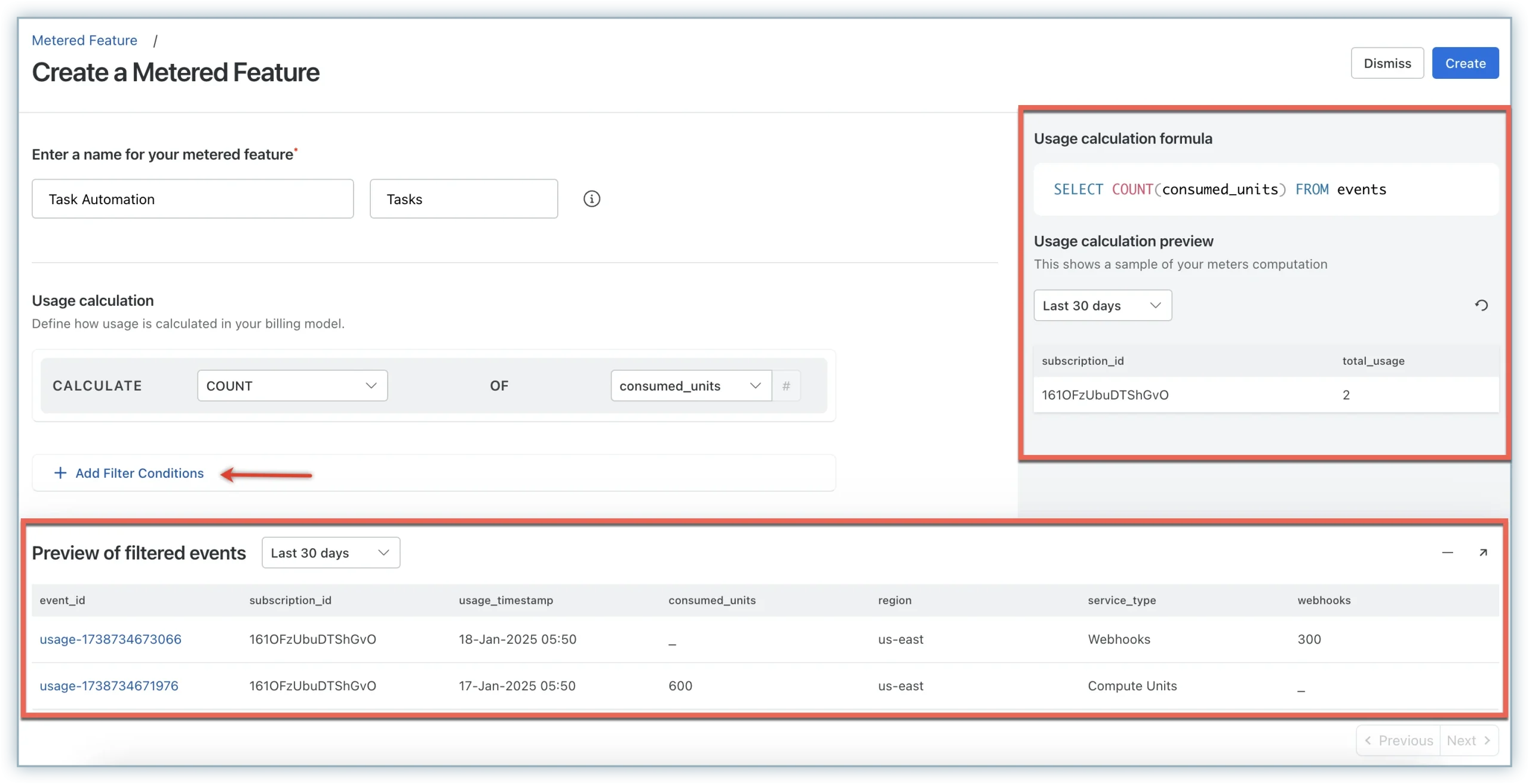
Chargebee shows the meter calculation alongside its preview of usage events.
7 Best Subscription Billing Software Options for Growing SaaS Teams
Start with the use case closest to your next pricing or finance change. Each platform below has a different reason to make the shortlist.
1. Chargebee for Included Usage and Overage
Chargebee Billing suits teams that sell a recurring plan with included usage and charge for consumption above it. Model the report-export example as a base plan and a metered add-on. Main limitation: Multi-entity management sits on Enterprise.
Pricing: Flow lists $0/month plus 0.80% or $99/month plus 0.65% of monthly invoicing volume. Enterprise requires a quote. Chargebee pricing.
2. Recurly for Failed-Payment Campaigns
Recurly Subscriptions suits teams that want to control what customers receive after an unsuccessful renewal payment. For example, configure a reminder and decide what happens to an account that stays unpaid. Main limitation: Starter has one campaign. The current pricing page lists multiple campaigns on All-Access.
Pricing: Starter is $249/month plus 0.9% of billings above the first $40,000 each month. Request an All-Access quote. Recurly pricing.
3. Maxio for B2B Billing and Finance
Maxio fits finance teams that need contract billing and accounts receivable in the same platform. For example, a customer with two contracts can use a contract-specific billing address on an invoice. Main limitation: Grow is listed up to $100,000 in monthly billings. Teams above that level need a Scale quote. Maxio contract billing profiles.
Pricing: Grow lists $599/month. Maxio says annual payment is standard, with monthly and quarterly payment available at a premium. Maxio pricing.
4. Zuora for Negotiated Deals Across Entities
Zuora suits teams that need to pass Salesforce quotes into billing and invoice from multiple legal entities. In a demo, take a quote with two charge types and route it to the right billing entity. Main limitation: Zuora documents that its multi-attribute price model cannot share products across entities. Zuora multi-attribute pricing documentation.
Pricing: Contact sales for a quote. Zuora lists multi-entity management under its Nine edition. Zuora editions.
5. Stripe Billing for Teams Already Using Stripe Payments
Stripe Billing fits teams that want to add subscriptions or usage charges within their existing Stripe setup. For example, send measured product usage to a Stripe meter and review the invoice at renewal. Main limitation: The Billing fee is separate from payment processing. Stripe usage billing guide.
Pricing: Pay-as-you-go Billing is 0.7% of Billing volume. Stripe also lists monthly rates under annual contracts. Stripe Billing pricing.
6. Paddle Billing for Bundled Checkout and Tax Handling
Paddle fits software sellers that want one provider for checkout, billing, and tax handling. For example, sell a standard annual plan and test a refund through the same workflow. Main limitation: Paddle's usage early access tracks allowances and overage, but it does not automatically charge for the overage. Paddle usage billing documentation.
Pricing: The published rate is 5% plus $0.50 per Checkout transaction. Custom pricing is available. Paddle pricing.
7. Orb for Billing From Raw Product Events
Orb fits product teams that need to define billable activity from the events their product emits. For example, use event attributes to count successful exports and exclude failed ones. Main limitation: Orb lists the Salesforce and NetSuite integrations on Enterprise. Orb billable metrics documentation.
Pricing: Business lists $6 per credit before volume discounts. Credits cover billing volume, event ingestion, and other measured activity. Enterprise is custom. Orb pricing.
Test the Billing Features That Affect Real Invoices
Use the same test cases across SaaS billing platforms. Ask each vendor to show the records you would use to explain an unexpected charge.
Reproduce a Plan Change
Test a mid-cycle upgrade and then a downgrade. Check whether the tool bills immediately or at renewal, and whether it creates a credit. Proration means adjusting a charge for the portion of the billing period affected by the change. Compare the expected amount with the invoice and confirm what happens if the change fails.
Follow a Failed Payment to Its Final Status
Dunning management is the process of following up on an unpaid invoice. It can include payment retries, reminders, and a request for updated payment details. Some failures need customer action before a payment can succeed, so test a case that can retry and one that needs a new payment method.
In a test environment, check which email the customer receives, whether the invoice closes after recovery, and when access changes. Make sure the application can distinguish a successful payment from a failed retry before you replace your current recurring payment tools.
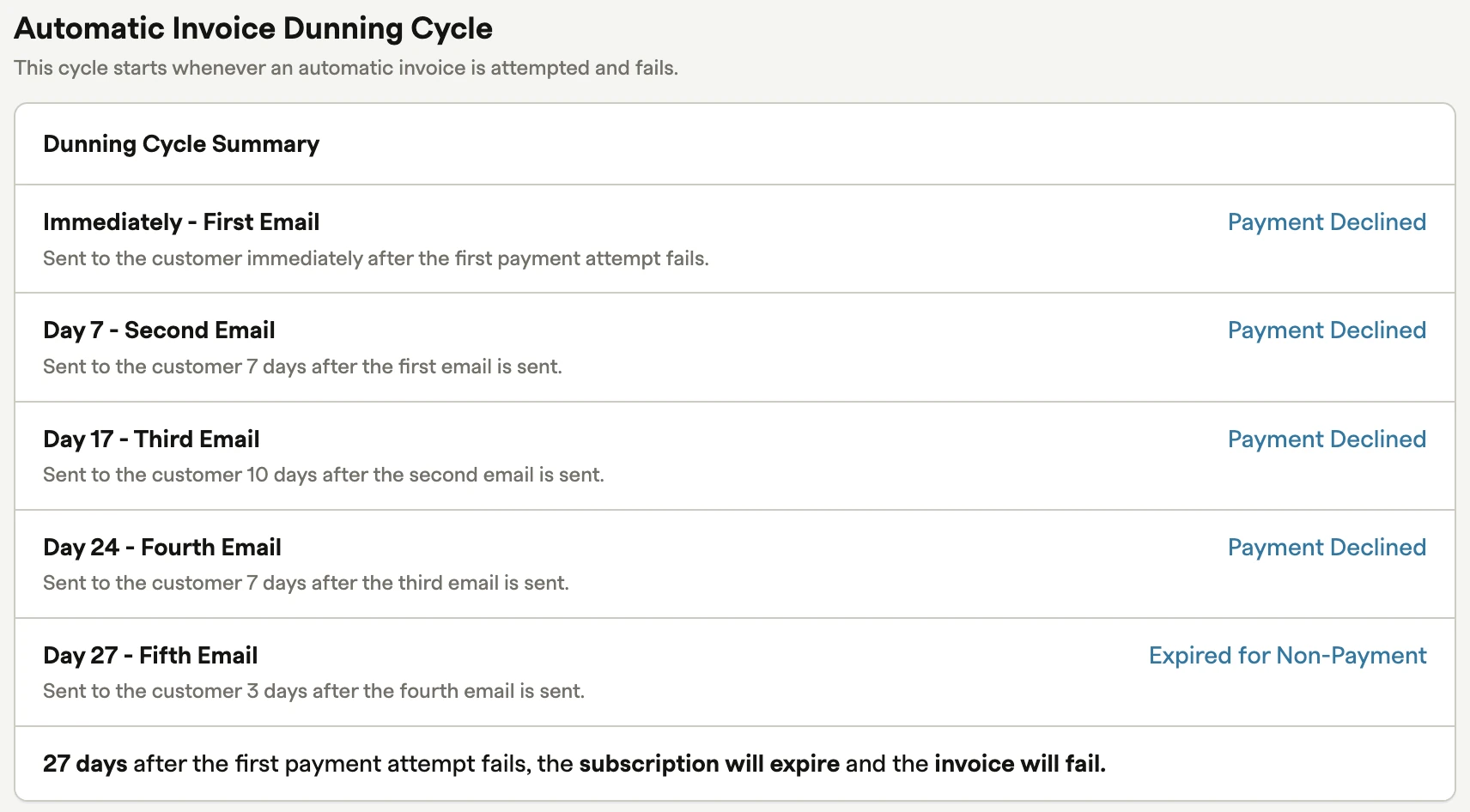
Recurly’s example shows the email schedule and final action for an unpaid invoice.
Preview an invoice with the entity, currency, and tax treatment your team actually uses. Then export its payment and any credit. For invoice reconciliation, confirm finance can match the records without reentering the invoice number or amount.
Billing records what the customer owes. Revenue recognition determines when finance records what the company earned, which our guide to SaaS revenue recognition software covers in detail. For subscription revenue management, check whether invoice lines and credits reach accounting with their service dates and contract references.
Pricing and Integration Comparison
Compare the fee basis against your own volume and test one connection to the system that needs the result.
Tool
How Pricing Scales
Integration or Handoff to Check
Chargebee
Monthly fee option plus invoicing volume
Usage events into the metered feature
Recurly
Monthly base and billings above the included amount on Starter
Payment and dunning events to your app
Maxio
Monthly billings band and any quoted modules
Contract billing profile to the invoice
Zuora
Quote for the edition and modules
Salesforce quote and billing-entity routing
Stripe Billing
Billing volume, plus separate processing
Stripe meters and invoice records
Paddle Billing
Checkout transaction amount and count
Usage balances or externally calculated one-time charges
Orb
Credits consumed by billings, events, and other meters
Raw events to Orb, with Stripe or Adyen for payments
How to Choose
Keep your existing subscription billing software if it already bills correctly and gives finance a clear record of payments and credits. If it falls short, use the table to pick a starting point. Compare it with the closest alternative using the same contract change, failed payment, and accounting export. For the handoff, our SaaS integration guide explains when a built-in connection is enough and when you need a custom one.
Choose by Your Main Requirement
Your Main Requirement
Start With
Standard seat plans and an existing Stripe setup
Stripe Billing. Test a seat change and the resulting invoice.
Metered product activity
Orb. Verify how it treats replays and events that arrive late.
Base plan plus included usage and overages
Chargebee. Confirm the allowance and overage show as expected.
Sales-led contracts with finance or entity requirements
Maxio for contract billing. Evaluate Zuora when quotes and entity routing drive the choice.
Failed-payment follow-up
Recurly. Verify the campaign and the action on an unpaid invoice.
Bundled self-serve checkout and tax handling
Paddle. Check the invoice and refund records.
Disclosure: AI tools assisted with research organization, drafting and visual creation. Product statements draw on the linked vendor documentation. The featured image is conceptual. The product screenshots come from vendor documentation and illustrate settings, with no hands-on testing implied.