How to Build a Scalable SaaS Stack Without Creating Tool Sprawl
November 12, 2026
0
A scalable SaaS stack gives each business function a clear home and connects apps where work passes between teams. Start with one authoritative record and one owner per
A scalable SaaS stack gives each business function a clear home and connects apps where work passes between teams. Start with one authoritative record and one owner per layer, then add software only when a real workflow needs it. This guide is for founders and operations leads who need their SaaS integrations to support day-to-day work as the team grows.
Last reviewed: November 7, 2026 | Pricing verified: November 2026
This is a documentation-based guide, not a hands-on product test.
Map the Five Layers of a Scalable SaaS Stack
Assign each layer a job, a named owner, and a place where the team can find the latest information. One app can cover more than one layer, and one person can own several. What matters is that everyone knows where to update a record and who fixes the process when it breaks.
Layer
What It Owns
Example Owner
System of record
Official customer, account, and deal records for the sales workflow
Sales operations lead
Communication
Conversations and alerts that point people to records or tasks
Operations lead
Work management
Tasks, assignees, due dates, and the status of work
Delivery lead
Automation
Rules that pass information between apps and route failed runs for review
Business systems lead
Analytics
Metric definitions and reports built from business records or product activity
Product analytics lead
A system of record is the place the team trusts for a particular fact. Your customer relationship management system, or CRM, can own the sales stage while the work tracker owns onboarding status. Both can show the customer's name, but the team should know where to change it.
When designing your business software stack, start with the jobs your team already does every week. If a general-purpose tool handles a job well, give it that responsibility before adding a specialist. Where the workflow needs industry-specific records or approvals, compare industry-specific and general-purpose SaaS against those requirements.
Design the Handoff Before Connecting the Apps
A handoff needs a source, a destination, and an owner who can recover it when something goes wrong. For each connection, write down what starts it, which fields travel, and which system can change each field. A scalable SaaS stack should make those rules easy to check when a team adds a new integration.
Worked Example of a Sales-to-Onboarding Handoff
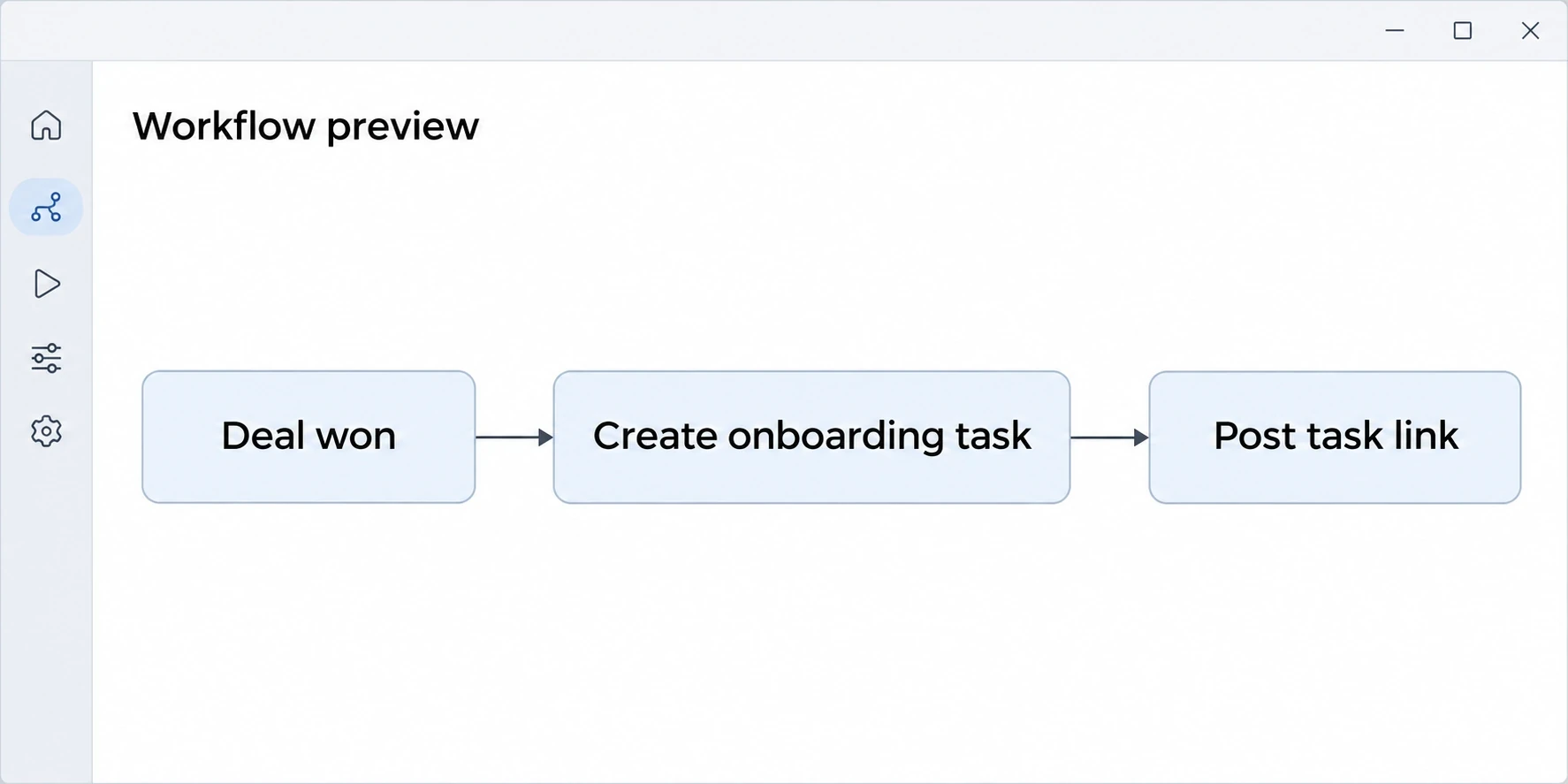
Say a hypothetical 30-person B2B software company needs delivery to start onboarding after a sale. Sales keeps the deal in the CRM and marks it won after signing. The handoff sends the deal ID, account ID, onboarding tier, and agreed kickoff date to the work tracker. The tracker creates the onboarding task and gives it to the delivery lead.
The communication app posts the task link after creation. The delivery team discusses questions there and updates status in the work tracker. Product analytics answers a separate question about whether the customer completed its first meaningful action. The analytics lead defines that action and uses the shared account ID to connect product activity to the onboarding record.
The business systems lead tests the same deal twice and expects one task. Use the deal ID as a unique key in the work tracker so repeated runs reuse the same task. If the tracker cannot enforce that rule, process runs one at a time and check the ID before creating a task. If a required field is missing, route the exception to an owner for review. If task creation succeeds and the chat alert fails, retry the alert separately so the task stays intact.
For a SaaS integration strategy, prefer the simplest connection that carries the right fields and makes errors visible. A built-in connector can be enough for a straightforward handoff. If you need field transformations or separate recovery steps, compare automation tools for more involved workflows. When one case must move through several apps in order, read workflow orchestration vs automation.
Illustrative workflow mockup for the hypothetical sales-to-onboarding handoff.
Find Duplicate Tools by Watching the Work
SaaS tool sprawl shows up when people enter the same information twice or disagree about which copy to trust. Ask someone to walk through a recent piece of work and note every place they record its status. Start there if your app inventory contains several tools with similar features.
Common Overlap
What to Look For
Where to Draw the Line
CRM and sales spreadsheet
A rep updates the same deal stage in both.
Keep the CRM as the editable record and use the sheet as a report.
Team chat and project tracker
A chat thread assigns work that never appears in the tracker.
Discuss the work in chat and assign it in the tracker.
Workspace database and task board
Two lists show different owners or due dates for the same task.
Choose one task list and link to it from the workspace.
App dashboards and analytics reports
Two charts count the same event in different ways.
Agree on the metric definition and designate the report used for decisions.
Software consolidation works when the remaining app can cover the workflow end to end. Before retiring the other tool, check the records, active automations, and reports it feeds. Keep an exception if a team can name a requirement the replacement cannot meet, then document who owns it. For teams choosing between two workspace tools, the Notion and Coda comparison can help define what to evaluate.
Illustrative scene showing two places where a team might track the same work.
Run This Test Before Adding a Tool
Add a tool when you can show which job it handles, where its records belong, and how the team will maintain it. Use the same real workflow in any trial so you can compare the options on the work people actually do.
What is missing today? Name the specific step that fails and what a successful outcome looks like.
Can an existing tool handle it? Ask the current owner to try the workflow before approving another app.
Which app owns the record? Write down where staff will create it, edit it, and look up the latest version.
Does the handoff work? Use a sample record to check required fields, timing, and what happens on a retry.
Who maintains it? Name an owner and a backup who can see failures and change the setup.
Can the team leave it? Try exporting representative data and list the workflows you would have to reconnect.
Make the result part of SaaS stack management. Record the decision and name the incumbent tool the newcomer replaces, if any. Add the new app to your access reviews from day one. For a self-hosted option, include the person who will handle upgrades and incidents in the trial decision. See the comparison of open source and hosted SaaS for that operating trade-off.
Choose Tools That Fit Their Assigned Layer
Choose a tool for the job it will own, then check the plan limits against the people or activity that workflow needs. The examples below illustrate each layer. A team can cover several jobs with tools it already has.
Layer and Example
Practical Use
Starting Price and Main Limit
System of record · HubSpot Smart CRM
Keep contact and deal records together.
HubSpot Free Tools is $0/month for up to two users. HubSpot pricing
Communication · Slack
Discuss work and send people to the relevant record.
Free is $0. Searchable message history is limited to 90 days. Slack pricing
Work management · Asana
Give work a named assignee and a due date.
Personal is $0 for up to two users. Starter is $10.99/user/month billed annually or $13.49/user/month billed monthly. Asana pricing
Automation · Make
Connect steps that run across apps.
Free is $0 with 1,000 credits per month. Steps use credits and scenarios stop when credits run out. Make pricing
Product analytics · PostHog
Track actions customers take inside the product.
Product Analytics includes 1 million events per month at $0, then starts at $0.00005 per extra event. PostHog Product Analytics pricing
Prices are in US dollars and were checked on November 7, 2026. To keep these subscriptions from creeping up as the team grows, use a SaaS spend management review. Before relying on an automated handoff, verify what your tool records when a step fails. For example, Make's incomplete execution storage is off by default. For help choosing how to measure product activity, see the comparison of PostHog, Amplitude, and Mixpanel.
Map One Workflow Before You Add Another App
Start building a scalable SaaS stack with one handoff that already causes missed work or duplicate updates. A short walkthrough with the people who do the work can show whether the problem is ownership, a missing connection, or a tool gap.
Trace the workflow. Pick a recent example and note where people enter data, update status, and check the result.
Assign ownership. Name the official record for each fact and the person responsible for each handoff.
Test the connection. Run a normal case, a repeated trigger, and a failure. Check the task or record after each run.
Remove one duplicate update. Keep the agreed record and point the team to it from the other apps.
Disclosure: AI tools assisted with research organization, drafting and visual creation. Product statements draw on the linked vendor documentation. The graphics are conceptual illustrations, not screenshots or evidence of product testing.