Best Customer Success Software for SaaS Teams: Features and Trade-Offs
November 7, 2026
0
The best customer success software helps your team spot a change in account health and decide who should act before renewal. Start with HubSpot’s Customer Success Workspace if
The best customer success software helps your team spot a change in account health and decide who should act before renewal. Start with HubSpot’s Customer Success Workspace if your team already works in HubSpot, or consider Vitally if your team needs different health rules for different customer segments. Look at Gainsight or ChurnZero when your team needs more structure around account reviews and follow-up. If you mainly need customers to discover features inside your app, start with our feature adoption tools comparison. For accounts that haven’t gone live yet, see SaaS customer onboarding software.
Last reviewed: November 8, 2026 | Pricing verified: November 2026
Quick Comparison
Start with the tool that fits how your team monitors existing customers. A small team can often add a workflow to its CRM, while a team with several customer segments may need a dedicated platform.
Tool
Best For
Starting Price
Key Limit
HubSpot Customer Success Workspace
Teams already using HubSpot CRM
Service Hub Professional from US$90/seat/month on annual billing
Service Seat and paid tier for health scoring. Required onboarding fee.
Vitally
Teams running one-to-many, hybrid, or high-touch coverage
Quote
Segment rules need reliable account and usage data.
ChurnZero
Teams that want risk scores to start follow-up
No public list rate
Check which data feeds and actions are in the proposal.
Gainsight
Teams standardizing scorecards and account reviews
Quote
Multiple teams need an owner to maintain shared scorecard rules.
Planhat
Teams modeling health and work around company records
Quote, annual billing upfront
Minimum Core User commitment plus platform fee.
Odie
Teams evaluating AI-guided account reviews
Customer Operating System listed from $1,500/month
Annual minimum term. Confirm how the underlying engine is priced.
Prices and plan details come from the linked vendor pages, checked on November 8, 2026.
How Customer Success Software Works
Customer success platforms turn customer activity, support history, and contract details into an account review. A customer success manager can see what changed, check the context, and assign an action. For customer lifecycle management after go-live, the useful records are usually the customer’s goal, the owner, the renewal date, and the next decision.
A health score summarizes signals your team chooses. Treat it as a reason to look at an account. An account can use your product heavily while losing its executive sponsor, and a low-usage account can be healthy if it only needs the product once a month. Churn prediction estimates the risk of a customer leaving. Renewal forecasting combines that risk with contract amounts, expected dates, and the account owner’s judgment.
A Worked Health Score
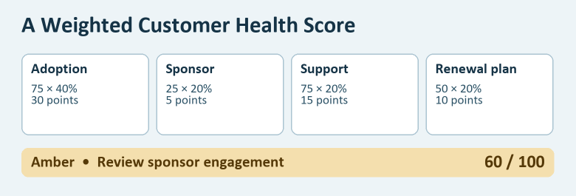
Suppose a hypothetical SaaS team uses four inputs for accounts that have finished onboarding. Each input is rated from 0 to 100, then multiplied by its weight. An account scores 75 on adoption, 25 on sponsor engagement, 75 on support, and 50 on its renewal plan.
Input
Weight
Rating
Weighted Points
Adoption of the core workflow
40%
75
30
Engagement from the sponsor
20%
25
5
Status of critical support issues
20%
75
15
Confirmed renewal plan
20%
50
10
Total
100%
60 out of 100
The team sets green at 75 or higher, amber from 50 to under 75, and red below 50. A score of 60 puts this account in amber. The manager checks why sponsor engagement fell and asks the account owner to book a renewal conversation. If the sponsor has left, the owner finds a new decision-maker before revisiting the renewal forecast.
A missing signal deserves its own status. If the usage feed fails, keep the last valid rating visible with its date and flag the account for review. Otherwise the score may look reassuring because it silently ignores the missing evidence.
Six Best Customer Success Software Options by Use Case
Choose a product based on the work it will help your team do each week. A scorecard only helps if managers can explain the result and act on it.
1. HubSpot for Teams Already Working in Its CRM
Use the Customer Success Workspace if your account records already live in HubSpot. Set up a score from company properties and activity so the owner can review it where they already work. Check whether your usage signal is available on the record before building the score.
Main limitation: Health scoring requires Service Hub Professional or Enterprise and an assigned Service Seat to configure it. Pricing:Professional starts at US$90 per seat per month when billed annually, plus required US$1,500 one-time onboarding.
2. Vitally for Different Levels of Customer Coverage
Use Vitally when a high-touch account needs different signals from an account served mainly through digital outreach. Its health scores can use different conditions and weights by segment. For example, consider sponsor meetings for a named account and core workflow activity for a self-serve account.
Main limitation: Different rules make cross-segment comparisons harder to interpret. Pricing:Tech-Touch, Hybrid-Touch, and High-Touch are quote-based. Vitally lists unlimited Observer seats across the plans.
3. ChurnZero for Acting on Changes in Account Health
Use ChurnZero if your team wants health signals to start follow-up. Its ChurnScores can trigger alerts and workflows. In a demo, have the vendor route a drop in health to the account owner and show how that owner can check the reason before contacting the customer.
Main limitation: Alerts can create work without clarifying the risk when the input is noisy. Pricing: The linked vendor page gives no public list rate. Request a proposal with the data connections and workflows you need.
4. Gainsight for Standardized Scorecards Across Teams
Use Gainsight when several teams need a shared way to review accounts. The Essentials and Enterprise packages both list Health Scorecards. Give the vendor a scorecard from one segment and ask how a manager would compare accounts, then open the evidence behind one low score.
Main limitation: Assign an owner to maintain scorecard definitions and check whether the same rules make sense across teams. Pricing: Request a quote for Essentials or Enterprise and confirm the features you need in writing.
5. Planhat for Configurable Company Health Profiles
Use Planhat when your team needs several views of customer health on the company record. Its Health Profiles and Success Units can separate an overall score from a single concern. For example, a manager can review the account’s aggregate health alongside the status of one usage signal.
Main limitation: Budget for the platform fee and the minimum Core User commitment. Pricing:Planhat’s quote can include additional Core Users and extensions. Plans are billed annually upfront, with unlimited View Users.
6. Odie for AI-Guided Account Reviews
Consider the Customer Operating System if your managers want an AI-guided queue of accounts to review. Test it with a real account history and ask a manager to check each recommendation against what the customer told your team.
Main limitation: The workspace runs on Odie’s Customer Knowledge Engine. The engine is listed separately from $500 per month. Ask how both prices apply to your portfolio and review frequency. Pricing:Odie lists the workspace from $1,500 per month, with terms starting at one year.
Where Totango and Catalyst Fit
Totango and Catalyst merged in 2024, and on September 10, 2026, the company renamed itself Odie. The announcement says legacy Totango and Catalyst customers keep the same contract, pricing and product. The Totango health documentation and Catalyst overview describe those products separately. If you already use one, compare your current health and renewal workflows with the new offer before deciding whether to switch.
What to Test Before You Buy
Test the account review from signal to assigned action. The best customer success software for your team should let the owner find the reason for a risk flag without searching across multiple records.
Check the Score Against Account History
In a trial or guided demo, replay a recent renewal and compare the score with what the team knew at the time. Ask which input changed and what evidence supports it. Customer health score software earns its place when the score makes that review easier and gives the owner a practical next action.
Follow the Risk Into the Renewal Forecast
Have the owner mark a renewal at risk and add the reason, amount, and next action. Confirm that the renewal manager can see the update and that changes to the date or amount reach the right system. Our guide to revenue operations software maps who owns that handoff. Use our SaaS integration guide to check who owns that connection and how failed transfers surface.
Pricing and Integration Comparison
Compare customer success tools against the same roster of users, accounts, and data sources. A low entry price can be less useful if the required CRM sync or onboarding support sits in a separate package.
Setup
Main Cost to Compare
Integration to Verify
Existing CRM or HubSpot Workspace
Paid tier, seats, and required onboarding
Can the account record reliably show product usage and support status?
Dedicated customer success platform
Platform fee, editable seats, implementation, and connectors
Do account IDs, renewal dates, and amounts match the CRM after each sync?
AI-guided workspace
Base platform, account coverage, analysis frequency, and any usage allocation
Can the reviewer trace a recommendation to recent account evidence?
When a CRM Is Enough
A CRM is enough when the team can keep renewal dates current, assign an owner, and review risks without assembling a separate spreadsheet every week. Try a renewal view with account, date, amount, risk, and next action. Compare HubSpot and Salesforce or review our CRM software comparison if you’re also choosing the system that will hold those records.
How to Choose
Shortlist the two best customer success software options for your hardest upcoming renewal. Give each vendor the same account history and ask the account owner to walk through the result. You’ll see which SaaS customer retention tools help the owner decide what to do before the contract comes due.
Your Main Requirement
Start With
Keep health and account work inside HubSpot
Customer Success Workspace
Apply different scoring rules by segment
Vitally
Start follow-up when a health score changes
ChurnZero
Standardize scorecards across teams
Gainsight
Pair an overall score with a single risk indicator