SaaS Security Management: How to Reduce Risks Across Business Apps
November 13, 2026
0
SaaS security management means controlling who can use your business apps, what connected tools can access, and how you remove access when it’s no longer needed. To reduce
SaaS security management means controlling who can use your business apps, what connected tools can access, and how you remove access when it’s no longer needed. To reduce SaaS security risks, start with apps that handle email, files, or customer records. This guide is for IT and operations leads who manage integrations that share data between apps.
Last reviewed: November 7, 2026 | Pricing verified: November 2026
This is a documentation-based guide, not a hands-on product test.
Start SaaS Security Management With an Access Review
Review people and integrations together because both can retain access after a project ends or someone changes roles. Use your identity directory, software inventory, and app admin pages to find accounts and connections. If you don't have an inventory yet, the SaaS spend management audit template lists every paid app and its owner. Ask app owners about tools bought or installed outside the normal approval process, sometimes called shadow IT.
Give each app an accountable owner and document what it can reach. Apply least privilege, which means giving a person or app only the permissions it needs for its job. The NIST Cybersecurity Framework pairs that principle with reviewing access permissions. NIST Cybersecurity Framework 2.0, PR.AA-05.
Access Review Checklist
Confirm the app and its owner. Record the workspace, business purpose, and person who can approve a change.
Identify the data it touches. Flag access to email, shared files, employee information, or customer records.
Review who can sign in. Check admins, ordinary members, guests, and any accounts that use a local password.
Review what can connect. Record third-party apps, service accounts used by software, and any permissions that apply across the organization.
Decide what to keep, narrow, or remove. Give each change an owner and a due date. Note any dependency to check before making it.
Verify the result. Reopen the admin view, confirm access changed as intended, and check that essential workflows still run.
A useful SaaS security management record shows why an exception exists and when someone will review it again. The vendor maintains the hosted service, while your team still decides which staff and integrations should have access. See the shared responsibilities across cloud service models.
Check What Third-Party Apps Can Access
Review the permissions an app requested and the access someone actually granted before changing it. OAuth is a way to let an app access data or take actions without giving it your password. Its permissions, called scopes, can let an app do things like read calendar events or modify files.
Google Workspace
In the Google Admin console, open Security → Access and data control → API controls. An admin with the Service Settings privilege can open Manage App Access and select View list under Accessed apps. Review the requested services in the list, then open the app for its OAuth client ID and access settings. Check the app’s access policy and which organizational units it applies to. Google Workspace Admin Help.
Microsoft Entra ID
In the Microsoft Entra admin center, open Entra ID → Enterprise apps → All applications. Select an app and open Permissions. Review Admin consent for organization-wide grants and User consent for grants tied to particular users or groups. Use an administrator role listed in Microsoft’s guide. You can revoke organization-wide grants in the portal, while revoking user-consent grants requires Microsoft Graph or PowerShell. Microsoft Entra permissions guide.
Worked Example of an Overbroad Request
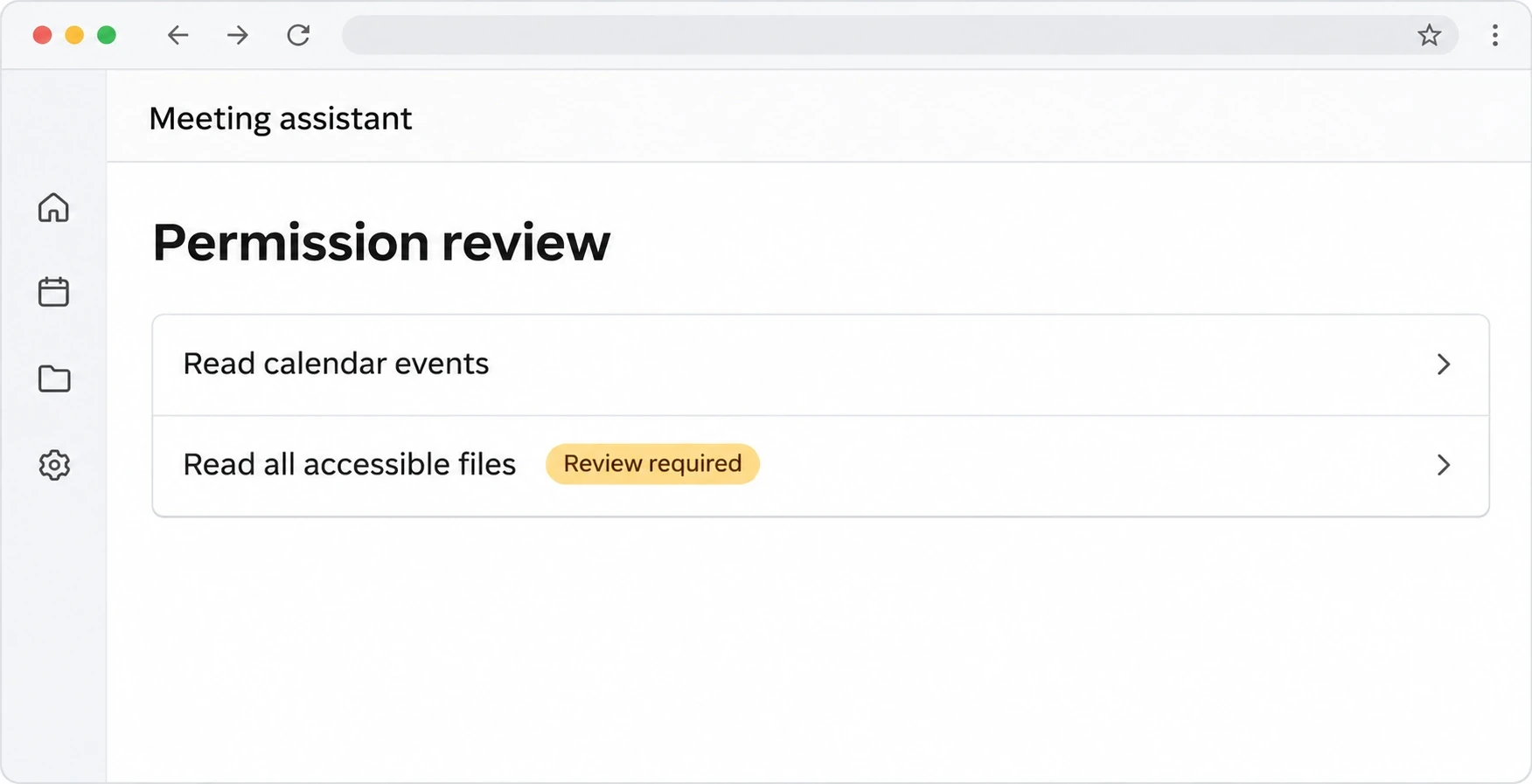
Say a hypothetical team wants a meeting assistant to read calendar events and suggest agenda items. The tool also asks to read all Drive files its users can access. That permission could expose unrelated contracts or staff documents, so the app owner asks the vendor why it is needed.
If the vendor offers calendar-only access, test it with a small group using sample calendar data. If broad file access is required, leave the request unapproved until the owner can justify it or find a narrower option. CISA’s Google Workspace baseline for federal agencies also calls for controlling third-party app access. CISA Google Workspace baseline.
Illustrative permissions panel for the hypothetical meeting assistant.
For a connection that already runs, identify its users and downstream workflows before restricting access. That check gives the owner time to replace a dependency or plan for downtime. It also helps separate new consent decisions from changes to active integrations.
Offboard People Across the Directory and the Apps
Remove access at the identity provider and check each important app for sessions or credentials that remain active. An identity provider is the service your organization uses to manage work identities and sign-ins. Microsoft notes that Entra cannot directly revoke a session that an app issued itself. Microsoft Entra user access guidance.
Confirm timing and responsibilities. Coordinate the cutoff with HR and name the people handling the directory, devices, and business apps.
Disable the work account and revoke sessions. Follow your identity provider’s process. End app sessions separately where the app supports it.
Remove access inside business apps. Check local accounts, guest access, admin roles, and group memberships. Verify that any automatic account removal ran.
Review credentials and ownership. Revoke personal tokens that remain active and replace shared credentials the person could still use. Preserve required records and transfer documents and workflows to a new owner.
Confirm the result. Check the directory and critical apps for active access. Record who verified removal and route anything unresolved to the app owner.
For SaaS access management, run through these steps with a test account before relying on automation. An app might handle directory sign-in but still require an administrator to close its local account or take ownership of records. Include that manual step in the offboarding checklist.
Illustrative offboarding scene showing a review of access beyond the central directory.
Verify Single Sign-On and Account Removal Before Buying
Check login and account removal separately because they solve different problems. Single sign-on (SSO) lets users sign in through a central identity provider. SAML is one standard for connecting an app to that provider. SCIM is a standard for creating, updating, and disabling accounts from the directory.
Some vendors reserve these controls for higher plans. In a trial or demo, ask the vendor to show how access changes when a test user leaves a group. Verify that the result meets your policy for guest accounts, local sign-in, and active sessions.
Tool
SSO and SCIM Plan
Relevant Price in USD
Slack
Business+ includes SAML SSO and SCIM. Slack documents a Free and Pro exception for workspaces connected to a Salesforce organization. Slack plan features
Business+ lists $15 per user/month billed annually or $18 billed monthly, before promotions. Slack pricing
Prices were checked on November 7, 2026. For a workspace or knowledge base, also test what happens when an external guest opens a shared page. The comparison of Glean, Notion, and Guru covers how permissions factor into choosing a knowledge tool.
Ask Vendors for Evidence That Covers Your Use
Match your vendor security review to the data the app will receive and the way your team will use it. Third-party SaaS risk rises when an app can reach more data than its job requires. Ask who handles each control and which plan or configuration it depends on.
Evidence to Request
What to Check
Follow Up If
SOC 2 Type 2 report
Check what service the independent auditor examined, the period covered, and any exceptions. AICPA report example
The report excludes the service you plan to buy or assigns controls to your team.
ISO/IEC 27001 certificate
Check the issuer, validity, and scope of the vendor’s information security management certification. ISO/IEC 27001 standard
The scope does not cover the service or operations you will rely on.
SSO and SCIM documentation
Confirm plan and identity provider support.
Removing a test user leaves a local login or active session that your team cannot close.
Data residency and retention details
Ask where primary data and backups live and what happens after deletion.
Backup locations or deletion timelines are unclear.
Data processing agreement (DPA)
Check who can handle your data and how the vendor reports incidents.
Another company can process the data and its role is unclear.
Record these decisions as part of SaaS governance, with an owner for each open item. Run the same review whenever a team proposes a new app, as part of building a scalable SaaS stack. If you consider replacing a hosted app with a self-hosted one, include who would patch, back up, and monitor it. See the operating responsibilities of open source and hosted SaaS.
Review One High-Risk App This Week
Make SaaS security management a recurring task by starting with one app that holds important data. Use its review to uncover a concrete SaaS application security gap your team can fix and verify.
Pick an app and name its owner. Start with email, file storage, or the customer database.
Check the people and connections. Review admins, guests, local accounts, and OAuth grants.
Fix the highest-risk access gap. Agree on the change, test any dependency, and confirm the new access state.
Record the evidence and next date. Save the decision and set a trigger to revisit it when the app, data, or owner changes.
Disclosure: AI tools assisted with research organization, drafting and visual creation. Product statements draw on the linked vendor documentation. The graphics are conceptual illustrations, not screenshots or evidence of product testing.