SaaS Revenue Recognition Software: Features, Workflows, and Selection Criteria
November 15, 2026
0
SaaS revenue recognition software turns customer contracts and billing records into a schedule of when to record revenue. Choose a tool that handles your hardest contract change and
SaaS revenue recognition software turns customer contracts and billing records into a schedule of when to record revenue. Choose a tool that handles your hardest contract change and lets finance trace the resulting entries to the original agreement. This guide is for finance leads and founders who need reliable schedules across different SaaS pricing models.
Last reviewed: November 7, 2026 | Pricing verified: November 2026
This is a documentation-based guide, not a hands-on product test.
What SaaS Revenue Recognition Software Does
The software calculates how much revenue belongs in each accounting period and prepares the entries finance uses to record it. When a customer pays upfront for a service you still owe them, the amount for future service sits in deferred revenue, a liability. As you deliver the service, the schedule shows how much of that balance to recognize as revenue.
Billing sends the invoice and records what the customer owes, the job of subscription billing software. Revenue recognition needs the contract and invoice lines, service dates, and approved changes to determine when the company earns the amounts. If you're still choosing the upstream system, see our comparison of Stripe, Paddle, and Chargebee.
Identify the contract. Confirm the agreement gives the company and customer enforceable rights and obligations and meets the standard’s contract criteria.
Identify the performance obligations. Work out which promises are distinct and must be accounted for separately. A series of qualifying services can count as one obligation.
Determine the transaction price. Calculate what the company expects to be entitled to for delivering those promises. Apply the rules for amounts that can change, such as some discounts or credits.
Allocate the price. Divide the transaction price among the obligations, generally in proportion to the price each would sell for separately.
Recognize the revenue. Record the allocated amount when or as the customer obtains control of each promised good or service.
Finance decides how these rules apply to the agreement and sets the policy in the tool. With usage-based pricing, confirm how the system handles usage data that arrives after the reporting period ends. Ask the vendor to show how the team spots missing activity before closing the books.
How a Midyear Upgrade Changes the Schedule
An upgrade can change the remaining revenue schedule while leaving the amounts from earlier months in place. In this hypothetical example, a customer pays $12,000 on January 1 for a year of hosted software. The service is delivered evenly, and the company recognizes $1,000 each month from January through June.
On July 1, the customer agrees to upgrade for the last six months and pays another $3,000. Assume the remaining months are distinct from the service already delivered and the upgrade price falls short of the relevant stand-alone selling price after appropriate adjustments. That pricing means the amendment fails the separate-contract test. Under ASC 606-10-25-13(a), the company treats the remaining service as a new contract for accounting purposes. It spreads the $6,000 still deferred plus the $3,000 upgrade over six months, or $1,500 a month.
Period or Event
Invoiced
Revenue Recognized
Deferred Revenue at End
January 1, before service
$12,000
$0
$12,000
January–June service
$0
$6,000
$6,000
July 1, before July service
$3,000
$0
$9,000
July–December service
$0
$9,000
$0
Full year
$15,000
$15,000
$0
An upgrade that qualifies as a separate contract gets its own schedule. If the remaining service forms part of an obligation the company has already partly delivered and can’t separate, the change can require an immediate adjustment. Talk to your accountant or auditor about how to classify a real amendment before you configure the rule.
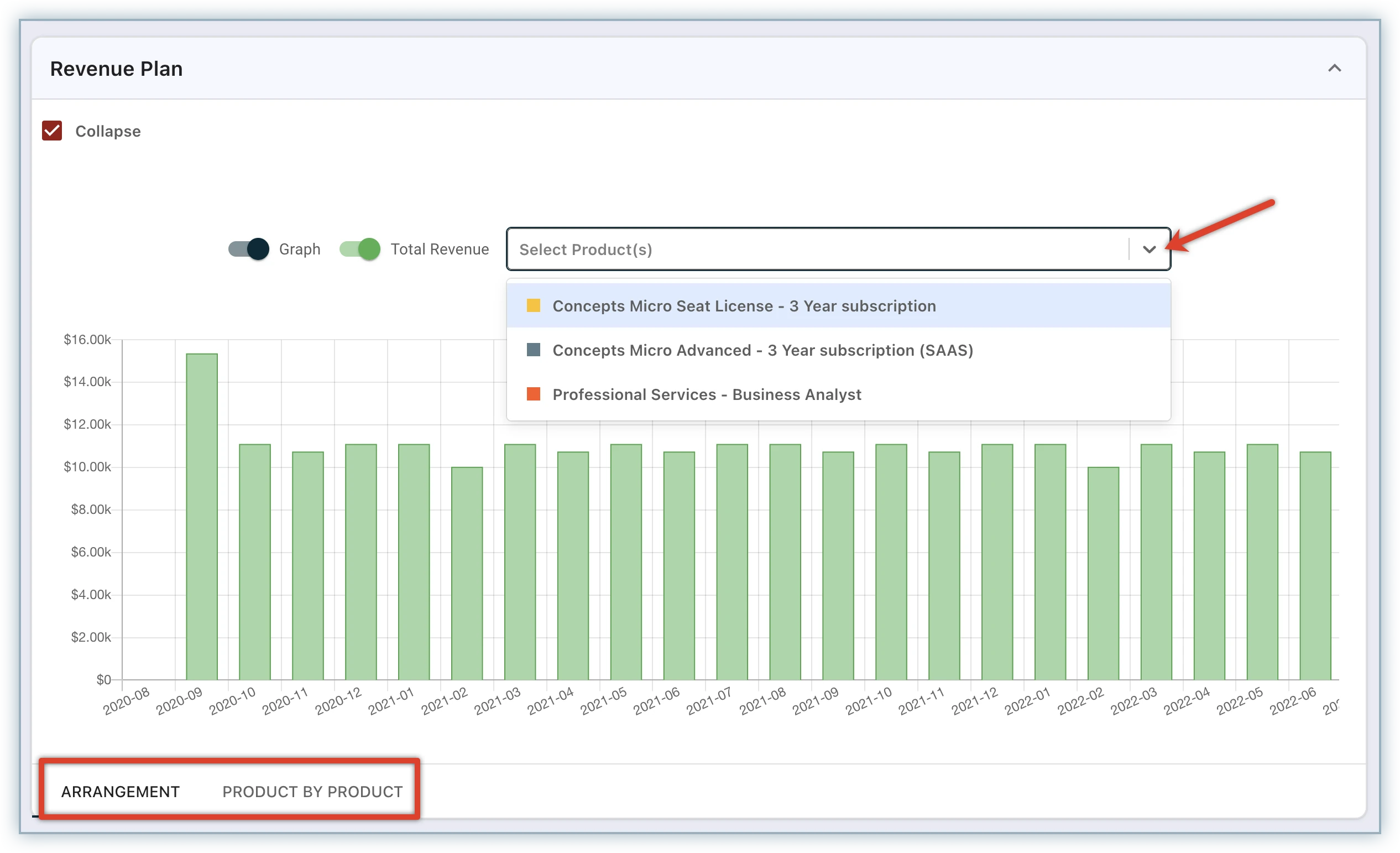
Chargebee RevRec shows the schedule for an order or selected products.
Look for a deferred revenue report that explains the change from the opening balance to the closing balance. This report, called a rollforward, shows new amounts deferred, revenue released, and adjustments. In the hypothetical contract, July opens at $6,000, adds $3,000, releases $1,500, and closes at $7,500.
Check whether the closing balance ties to the general ledger, the accounting system’s record of balances and entries. Good deferred revenue management also lets reviewers trace an adjustment back to the contract version, effective date, and approval. If finance changes a rule or reopens a period, the audit trail should show who acted, when, and what changed.
Ask how entries move into the ledger and what happens when a transfer fails. A native integration or an API connection can work if the team can retry failed entries and verify that the retry creates no duplicates. If finance posts a summary entry, keep the underlying detail accessible so reviewers can explain the total.
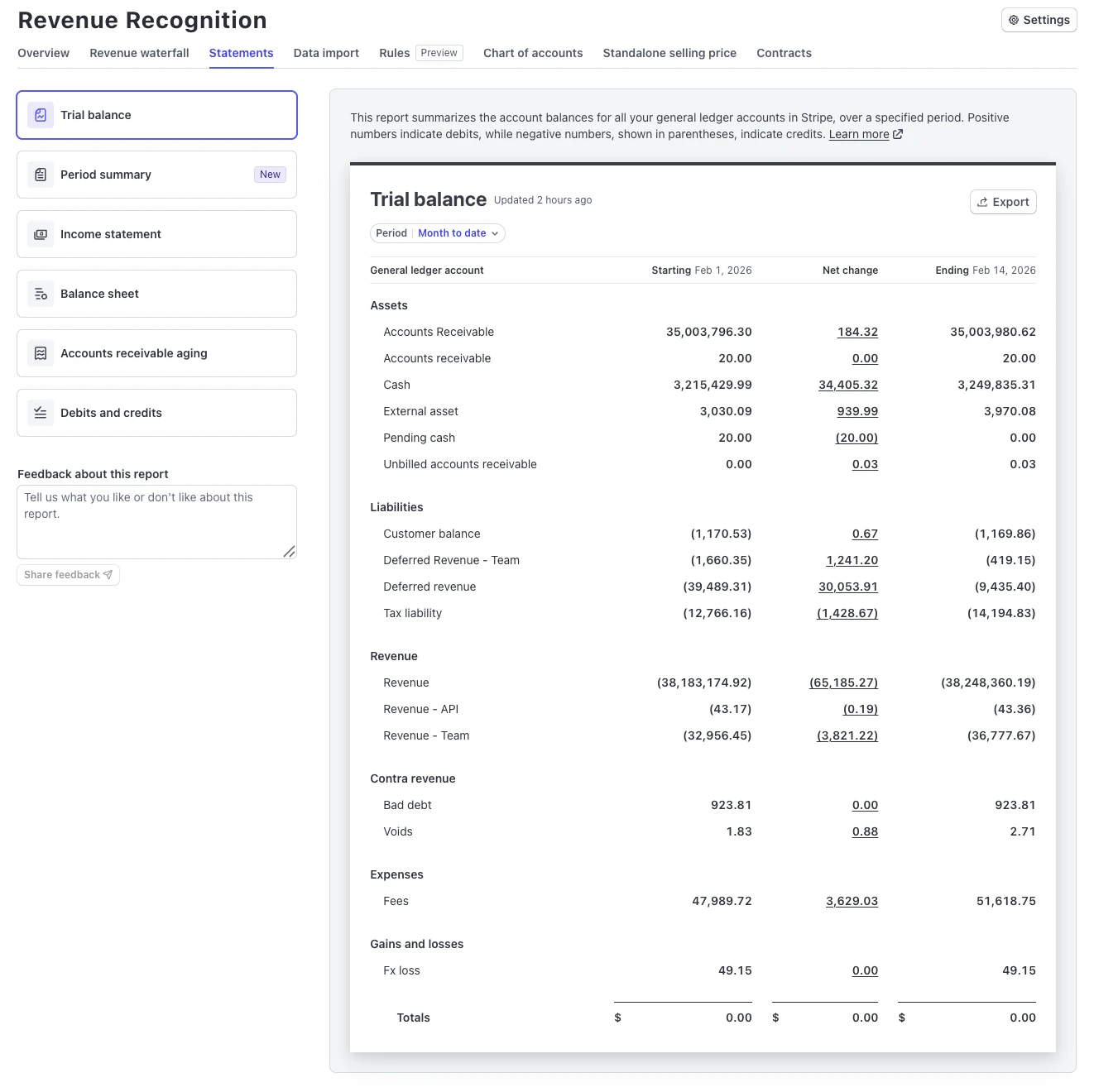
Stripe’s trial balance groups the starting balance, activity, and ending balance by account.
Start with the kind of system that already holds your cleanest records. A billing-linked tool fits a team with one main source. Subscription accounting software or a dedicated revenue system makes more sense when finance combines several sources or allocates revenue across bundled obligations. If your existing ledger can schedule and reconcile straightforward contracts, start there.
Teams that need to group transactions into revenue contracts. The lowest tier omits prospective and retrospective contract modifications and stand-alone selling price allocation.
Request a quote. Check the cost of any ledger connector.
NetSuite finance teams that want schedule rules and journal entries in their existing system. Allocating across obligations requires the Revenue Allocation add-on.
Teams that want contracts, subscription revenue, and ledger activity in Intacct. Confirm which modules cover the changes and allocations your contracts need.
Prices and plan details come from the linked vendor pages, checked November 7, 2026.
Compare SaaS revenue recognition software on the actual plan you would buy. SaaS accounting automation is most useful when the standard workflow handles common changes and gives finance a clear way to review exceptions. Ask vendors to price the same contract volume and explain which features require an add-on.
Test One Contract Before You Buy
Use a contract your team already knows how to account for to compare SaaS revenue recognition software. The best demo for your decision is one where finance can explain every difference between the vendor’s output and its own schedule.
Set the expected result. Remove sensitive customer details and record the opening balance, recognition by month, and expected ledger entries.
Replay the change. Enter an upgrade or credit and compare the revised schedule with your expected result. Ask the vendor to show the rule behind each change.
Trace the entries. Follow an adjustment from the ledger back to its approval and contract version. Export the rollforward and confirm it ties to your ledger.
Compare the full cost. Get the price for your transaction volume, entities, seats, connectors, and implementation. Include the finance time you’ll need to review exceptions.
Run a parallel close. Use the same period in both systems before switching. Assign someone to explain each difference and sign off on the balances.
If you have two contenders, send both the same contract and expected schedule before booking demos. You’ll see which parts of the close each tool can handle and where your team will still need to step in.
Disclosure: AI tools assisted with research organization, drafting and visual creation. Product statements draw on the linked vendor documentation. The featured image is a conceptual illustration. The two inline screenshots come from the vendors’ documentation.