Best Sales Forecasting Software for Growing Sales Teams
November 17, 2026
0
The best sales forecasting software for most growing teams starts with the CRM they already use. HubSpot and Salesforce suit teams that want native forecast reviews, while Clari
The best sales forecasting software for most growing teams starts with the CRM they already use. HubSpot and Salesforce suit teams that want native forecast reviews, while Clari Forecast and Gong Forecast fit teams that need a dedicated review process. If your CRM decision is still open, compare HubSpot and Salesforce before choosing a forecast add-on. A forecast is only as good as the CRM data behind it, which our guide to revenue operations software covers.
Last reviewed: November 8, 2026 | Pricing verified: November 2026
This is a documentation-based guide, not a hands-on product test.
Quick Comparison
Start with the least complex option that supports the forecast you submit each week. These picks are ordered from CRM options for growing teams to dedicated products for more involved reviews.
Tool
Best For
Starting Price for This Use
Key Limit
HubSpot Sales Hub
HubSpot teams running manager forecasts
Professional from US$90/seat/month on annual billing
One-time onboarding fee. Forecast team hierarchies are an Enterprise feature.
Salesforce
Salesforce teams that need forecast categories and rollups
Pro Suite at US$100/user/month, billed annually
Advanced forecast and pipeline management sit in higher editions.
Pipedrive
Small teams that want deal-based revenue projections
Premium at US$49/seat/month, billed annually
The deal revenue forecast report requires Premium or higher.
Clari Forecast
Multi-team forecast reviews under Salesloft
Quote
Confirm which forecast views and integrations the quote covers.
Gong Forecast
Teams reviewing deals alongside calls and other activity
Quote, per-user licenses plus platform fee
The quality of activity evidence depends on what the team captures.
Aviso Forecasting Core
Teams comparing manager calls with model predictions
Quote
Confirm how well the model works with your own deal history.
Prices come from the linked vendor pages, checked on November 8, 2026. The CRM prices are the rates for the plans discussed, with billing details below.
How Sales Forecasting Software Works
Sales forecast tools turn open deals and closed sales into an estimate for a defined period. Agree on the measure first. A bookings forecast tracks the value of deals expected to close. A forecast of recognized revenue follows when your company earns that revenue under its accounting policy. The same contract can appear in those forecasts at different times.
Method
When to Use It
What to Check
Weighted pipeline
You have deal amounts, expected close dates, and useful stage probabilities.
Stage weights can hide differences between deal sizes, segments, and sales cycles.
Historical conversion
You have comparable past deals and reliable snapshots from the same point in prior quarters.
A pricing change or new market can make old conversion rates less useful.
AI or activity signals
You have reliable CRM history and enough relevant activity to spot changes in deals.
Check what drove a score and compare the model with a simple baseline.
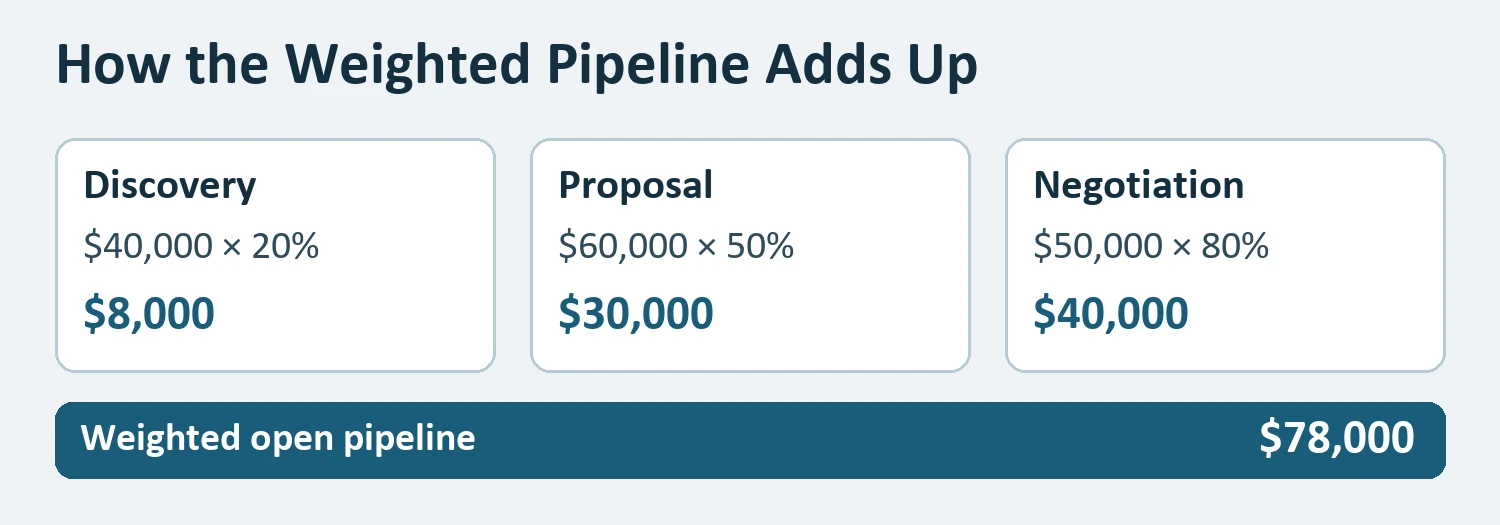
Suppose a hypothetical SaaS team has $40,000 in discovery at 20%, $60,000 in proposal at 50%, and $50,000 in negotiation at 80%. Weighted pipeline multiplies the value at each stage by its assumed chance of closing in the period. The contributions are $8,000, $30,000, and $40,000, for an open-pipeline estimate of $78,000.
If $20,000 has already closed this quarter, the combined estimate is $98,000. For a downside scenario, move one $25,000 negotiation deal into next quarter. Its weighted contribution was $20,000, so this quarter’s estimate falls to $78,000, including closed sales. The difference gives managers a deal to review during scenario modeling.
Stage probabilities convert $150,000 of open pipeline into a $78,000 estimate in this hypothetical example.
Six Sales Forecasting Tools by Use Case
The CRM options give managers a starting point using the deal records they already have. The dedicated revenue forecasting software is worth a look when your team needs a different review process or more evidence behind the forecast.
1. HubSpot Sales Hub for Native Forecast Reviews
Use Sales Hub Professional if managers already review HubSpot deals and need a shared forecast. In a weekly review, ask a manager to separate the deals they expect to close from the rest of the pipeline. Check which users need paid Sales Seats to submit a forecast.
Main limitation: HubSpot lists forecasting across team hierarchies under Enterprise. Pricing: Professional starts at US$90 per Sales Seat per month on annual billing, with required US$1,500 one-time onboarding.
2. Salesforce for Forecast Categories and Team Rollups
Use Salesforce if opportunity owners already work there and managers need shared rules for categories such as Commit, meaning deals they expect to close. Ask an admin to map opportunity stages to forecast categories and verify that managers see the intended team totals.
Main limitation: Pro Suite lists sales quoting and forecasting, while advanced forecast and pipeline management sit in higher editions. Pricing: Pro Suite is US$100 and Core is US$195 per user per month, billed annually. See our Salesforce pricing guide for the wider CRM decision.
3. Pipedrive for Deal-Based Revenue Projections
Use Pipedrive when the main question is how much deal value could close in each period. The deal revenue forecast report uses deal values and expected close dates. Try moving one large deal into next month and check how that changes the report.
Main limitation: Growth includes product revenue forecasts, while the deal forecast report requires Premium or higher. Pricing: Premium is US$49 per seat per month billed annually, or US$588 per seat per year.
4. Clari Forecast for Multi-Team Forecast Reviews
Use Clari Forecast when managers need to collect and review forecasts across teams. Salesloft and Clari now operate under the Salesloft brand, and Clari Forecast keeps its product name. Ask for a demo that follows a forecast from a front-line manager to the company total.
Main limitation: Budget time to map your sales structure and CRM data to the forecast. Pricing: Request a quote from Salesloft and confirm which integrations and forecast views it includes.
5. Gong Forecast for Reviews That Use Deal Activity
Use Gong Forecast if managers want to review a forecast alongside the evidence from calls and other deal activity. In a demo, pick one deal where the rep and manager disagree and ask the vendor to show what each can see.
6. Aviso Forecasting Core for Comparing Model and Manager Calls
Use Aviso when you want to evaluate model predictions alongside a manager’s forecast. Ask the vendor to replay a quarter where several large deals slipped and show how its estimate changed as new information arrived.
Main limitation: A model’s usefulness depends on the history and signals available for your sales process. Pricing: Forecasting Core is quote-based. Confirm the terms for historical data and integrations.
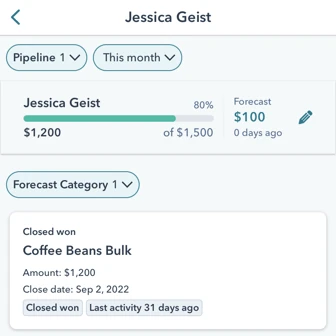
HubSpot’s mobile forecast view shows the submitted forecast alongside goal progress and deal activity. Source: HubSpot documentation.
What to Test in a Forecast Demo
Give vendors the same historical CRM snapshot and see whether their forecast can be reproduced. A snapshot is a copy of the records as they appeared on a specific date. Use only what the team knew at that point, so the forecast cannot benefit from deal changes recorded later.
Hold the measure constant. Use the same period, currency, and bookings definition for every tool. Quota attainment compares closed sales with a target. Forecast accuracy compares a prediction with what closed.
Measure the miss at the same point. Calculate forecast variance as forecast minus actual. Compare an early-quarter and a late-quarter snapshot separately because their information differs. In the hypothetical example, if the team closes $85,000, the original $98,000 forecast is $13,000 high. Repeat the check over several comparable quarters to see whether the forecast tends to run high or low.
Explain the changes. Check whether managers can see who changed a forecast and which deal amounts or dates moved. Compare pipeline forecasting features on that review task, as well as on the final number.
Sales analytics platforms can show performance after the period closes. The best test of sales prediction tools is whether they give managers enough time and evidence to act while the quarter is still open.
Pricing and Integration Comparison
Price sales forecasting software for the people who submit and review the number, plus the data needed to explain it. If you’re weighing a CRM switch first, use our CRM software comparison and check the Salesforce-to-HubSpot migration guide for what moving deal history entails.
Setup
Cost to Check
Connection to Verify
Native CRM forecast
Required tier, paid seats, and one-time onboarding
Confirm that deal owners, stages, currencies, and team permissions carry into the forecast.
Dedicated forecast product
Licenses, platform fees, implementation, and any paid integrations
Confirm CRM sync direction, supported objects, and how much historical data you can bring in.
How to Choose
Shortlist two sales forecasting software options that fit your main requirement. Give both the same snapshot, a scenario with a slipped deal, and the output your managers use. Choose the one that lets reviewers explain the number and repeat the process next week.
Your Main Requirement
Start With
Forecast from an existing HubSpot or Salesforce pipeline
The relevant native forecast plan
Project revenue by deal value and expected close date
Pipedrive Premium if you already use Pipedrive
Review forecast submissions across multiple teams
Clari Forecast
Bring conversation evidence into deal reviews
Gong Forecast
Compare a model prediction with the manager’s call
Aviso Forecasting Core
Disclosure: AI tools assisted with research organization, drafting, and the cover image. The weighted pipeline diagram uses the article’s hypothetical figures. The mobile screenshot comes from HubSpot’s documentation. Product statements draw on the linked vendor documentation.