Glean vs Notion vs Guru: The Best AI-Powered Knowledge Management Tools
August 15, 2026
0
Search inside most companies breaks down long before anyone opens an AI chatbot. Documentation lives in Notion, tickets sit in Jira, decisions get buried in Slack threads, and
Search inside most companies breaks down long before anyone opens an AI chatbot. Documentation lives in Notion, tickets sit in Jira, decisions get buried in Slack threads, and nobody is sure which wiki page is current.
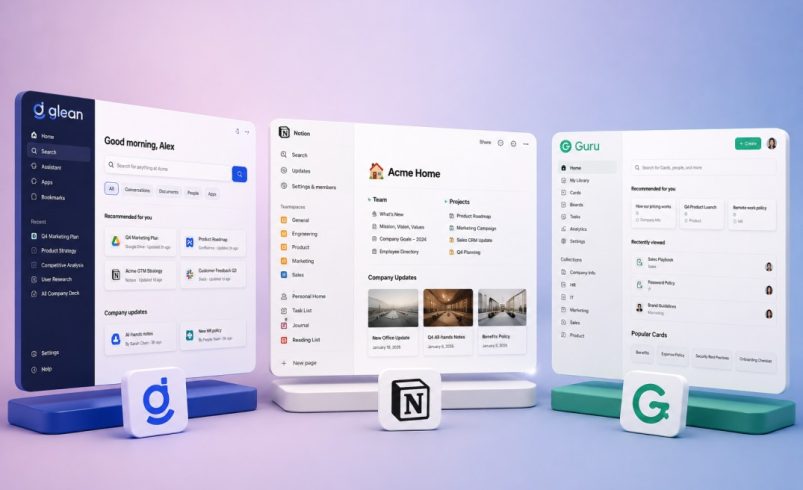
Glean, Notion, and Guru each attack that problem from a different angle. Glean indexes everything a company already runs on. Notion turns the workspace itself into the knowledge base. Guru puts a verification layer on top of what teams already write. Picking between them starts with naming which of those three problems your organization actually has.
Quick Comparison: Glean vs Notion vs Guru
Category
Glean
Notion
Guru
Core approach
Federated AI search across connected apps
AI built into docs, wikis, and databases
Verified knowledge cards with AI search
Best for
Large enterprises with fragmented tool stacks
Teams that already live in Notion
Support, sales, and HR teams needing verified answers
Entry pricing
Custom, sales-led, no public list price
Business plan at $20/user/month for full AI
Self-serve at $25/seat/month, 10-seat minimum
Typical rollout
3 to 6 months for enterprise deployment
Immediate, workspace already exists
Weeks, via browser extension and integrations
Governance model
Inherits permissions from source apps
Workspace-level roles, SSO on Business+
Seat-based roles plus verification ownership
What Does AI-Powered Knowledge Management Mean
AI-powered knowledge management software connects an organization’s scattered information, documents, chats, tickets, and wikis, into one AI layer that answers questions in natural language instead of returning a list of links. The category sits between three older markets, i.e, enterprise search, internal wikis, and help desk knowledge bases.
What separates 2026 tools from older intranet search is retrieval-augmented generation. Instead of just ranking documents, the AI reads them and writes a direct answer, often with a citation back to the source. That shift is part of a broader move toward agentic AI reshaping SaaS tools, where software increasingly acts on information rather than just surfacing it. The differences between Glean, Notion, and Guru show up in what they index, how they verify accuracy, and who controls access.
Glean Overview
Glean is built as a search and knowledge layer that sits across an existing stack rather than replacing any single tool. It connects to more than 100 workplace applications, including Slack, Google Workspace, Salesforce, Jira, and Confluence, then indexes that content while inheriting each source system’s existing permissions.
On top of the index, Glean adds a conversational assistant and, more recently, autonomous agents capable of multi-step tasks rather than simple document retrieval. The platform targets larger organizations with data spread across dozens of systems. Deployment is sales-led, and full enterprise rollout typically runs three to six months.
Notion Overview
Notion approaches knowledge management from the opposite direction. Instead of indexing outside tools, it wants documentation, wikis, and databases to live inside Notion itself, with AI layered on top of that native content.
Notion AI restructured its plans in 2025, retiring the standalone AI add-on and folding the full feature set, including Notion Agent, AI-powered search, AI meeting notes, and enterprise search, into the Business tier. Custom Agents, Notion’s automated background workflows, run on a separate credit system billed on top of a seat. For teams that already write and store documentation in Notion, the AI layer requires no new indexing step because the content already lives there.
Guru Overview
Guru organizes information into short, focused knowledge cards rather than long documents, and its defining feature is automated content verification. Card owners get reminders to confirm information is still accurate, and unverified cards are flagged so employees know when an answer might be stale.
Guru’s AI search and generative answers sit on top of that verified card library, and results surface directly inside Slack, Microsoft Teams, and a browser extension so employees rarely need to switch tools. Guru is most commonly adopted by support, sales, and HR teams that need consistent, trustworthy answers rather than broad search across every internal system.
Feature and AI Capability Comparison
Category
Glean
Notion
Guru
Search scope
100+ connected apps, org-wide
Native Notion content, plus integrations
Knowledge cards plus connected app search
AI answers
Generative assistant and autonomous agents
Notion Agent, AI Q&A, meeting notes
Verified AI answers with citations
Content freshness
Inherits the source system’s freshness
Manual editing with version history
Automated verification workflows
Where it surfaces
Web app, Slack, browser
Notion workspace, connected apps
Slack, Teams, Salesforce, browser extension
Pricing and Value Comparison
Pricing is where the three products diverge most, and buyers should treat every figure below as a starting point rather than a final quote.
Glean does not publish a price list. Industry pricing trackers place base licensing between roughly $50 and $75 per user per month, with enterprise contracts commonly starting around 100 seats. Once infrastructure and onboarding are factored in, buyer-reported annual spend often lands well into six figures for mid-to-large deployments, according to Vendr’s Glean marketplace data and a separate Glean pricing breakdown from Workativ.
Notion’s AI features now require the Business plan at $20 per user per month billed annually, after the company retired its standalone $10 AI add-on in 2025. eesel’s Notion pricing analysis confirms that Free and Plus users are limited to a trial of the AI features.
Guru’s self-serve plan lists at $25 per seat per month but carries a 10-seat minimum, which puts the effective floor near $250 per month. Guru’s Gartner Peer Insights profile confirms Enterprise pricing is quoted separately for larger deployments.
None of the three runs on a pure consumption model in the sense SaaSComparely’s usage-based pricing explainer describes. All three price primarily on seats, though Notion’s AI credits and Glean’s consumption-based add-ons for premium features layer a usage component on top of the base license.
Security, Enterprise, and Scalability
All three vendors offer SSO and role-based access at their higher tiers, but the depth differs. Glean inherits permissions from every connected source system, which means its access control is only as accurate as the permissions already set in Slack, Salesforce, or Confluence, a dependency worth auditing before rollout.
Notion’s SSO, advanced permissions, and audit logging sit behind the Business and Enterprise tiers. Guru applies verification ownership on top of standard role-based access, which helps compliance-heavy teams like HR and support keep policy content current, though its governance tooling is narrower than Glean’s enterprise-wide search controls.
Best Use Cases for Each Platform
Glean: large, tool-sprawling enterprises where the real problem is finding information across dozens of disconnected systems, not writing new documentation.
Notion: teams that already treat Notion as their primary workspace and want AI answers without introducing a second knowledge tool.
Guru: support, sales, and HR teams that need short, verified answers surfaced inside the tools reps already use, especially where outdated information carries real risk.
Strengths and Weaknesses
Glean
Strength: the broadest connector coverage and the strongest option for org-wide search.
Weakness: opaque, sales-led pricing and a rollout timeline that assumes real enterprise budget and IT involvement.
Notion
Strength: no separate indexing step, so teams already on Notion see value immediately.
Weakness: full AI now requires the pricier Business tier, and it is weaker than Glean at unifying content that lives outside Notion.
Guru
Strength: the verification workflow keeps a smaller set of critical answers demonstrably current.
Weakness: per-seat pricing with a 10-seat floor adds up quickly, and it is not designed for broad enterprise-wide search.
Which Platform Should You Choose?
The decision usually comes down to where the knowledge already lives. If it is scattered across a dozen SaaS tools and the real cost is time spent hunting for it, Glean’s connector-first model addresses that directly, assuming the budget supports enterprise pricing.
If the team already writes and stores documentation inside Notion, adding Notion AI is the lower-friction path. And if the priority is keeping a smaller set of critical answers, policies, pricing, and product details verifiably current for customer-facing teams, Guru’s card-based verification model is built specifically for that job.
The Bigger Picture
None of these three is a universal winner because they are not solving the same problem. Glean is the strongest choice for enterprise-wide search across fragmented systems. Notion is the strongest choice for teams that want AI without adopting a new tool. Guru is the strongest choice for teams where verified, current answers matter more than search breadth.
The right pick depends on which of those three needs is costing your team the most time today.