
Best Knowledge Base Software for SaaS Companies
- October 24, 2026
- 0
Most SaaS support queues fill up with questions someone already answered in a Slack thread, an old release note, or one agent’s memory. The best knowledge base software
Most SaaS support queues fill up with questions someone already answered in a Slack thread, an old release note, or one agent’s memory. The best knowledge base software

Most SaaS support queues fill up with questions someone already answered in a Slack thread, an old release note, or one agent’s memory. The best knowledge base software for SaaS depends on who reads the answers and who keeps them current. Document360 and Helpjuice suit teams buying a dedicated documentation platform. Help Scout, Zendesk, and Intercom tie a help center to customer support. GitBook fits product and API docs, while Confluence and Notion make sense when internal knowledge comes first.
|
Platform |
Best For |
Starting Price |
|---|---|---|
|
Document360 |
Dedicated documentation teams |
Custom quote |
|
Helpjuice |
Standalone, branded knowledge base |
$249/month (30 users) |
|
Help Scout |
Small teams needing inbox + help center |
Free; Standard $25/user/month |
|
Zendesk |
Knowledge inside a full support suite |
$55/agent/month (annual) |
|
Intercom |
Messenger-led support with Fin AI |
$29/seat/month ($19 new-customer offer) + $0.99 per Fin outcome |
|
GitBook |
Product and developer documentation |
$65/site/month + $12/user (annual) |
|
Confluence |
Internal knowledge in Atlassian teams |
Free up to 10 users |
|
Notion |
Startup wikis and light public guides |
Free; Plus $10/member/month |
Prices come from the linked vendor pages, checked on October 24, 2026. All figures are USD. Confirm current offers, taxes, and billing terms before purchasing.
A knowledge base turns product information into searchable answers. Writers publish setup guides, troubleshooting steps, and FAQs. Customers or employees find them through navigation, search, or a help widget inside the app.
The audience shapes everything else. A public help center serves anyone. Private docs sit behind a customer login. An internal wiki holds support procedures, and developer docs cover APIs and code samples. Decide which one comes first before comparing features.
The harder work starts after publishing. Every release can break an article, so someone has to own each guide and update it when the product changes.
Each pick below is chosen for a specific workflow, so the best knowledge base software for SaaS teams in one row may be the wrong fit in another. Recommendations are editorial assessments based on vendor documentation, not hands-on performance rankings.
Document360 fits companies where documentation has its own owners and review process. It supports public and private knowledge bases plus API docs, and its workflow builder lets you assign each publishing stage to a person or group.
Pricing is fully custom, based on team accounts, workspaces, languages, security needs, and AI usage. Ask the vendor to price your actual workflow, including AI search volume, since each Eddy AI credit covers one question.
Helpjuice works when you want a branded knowledge base but plan to keep your current helpdesk. All plans include customization, workflows, and localization. The $249/month plan covers 30 users without AI, while the $449/month plan adds AI search, writing, and a chatbot for 100 users.
Check the user count carefully. Helpjuice counts everyone added to the backend, including internal viewers. Customers reading public articles don’t count.
Help Scout is the easiest starting point for startups. Its Free plan includes five users, one inbox, and one Docs site. Beacon places articles on your website or inside your product, and Docs reporting shows failed searches so you can spot missing content.
The catch is that Docs isn’t sold separately. You’re buying a support platform, with paid seats from $25/user/month, extra Docs sites at $20/month (annual), and AI resolutions at $0.75 each.
Zendesk makes sense when you’re buying ticketing, messaging, and knowledge together. Suite Team at $55/agent/month (annual) includes a knowledge base.
If you only need documentation, the wider suite is more than you’ll use. Also note that approval workflows are listed under Suite Enterprise + Copilot, a sales-led tier, so entry plans don’t include full publishing controls.
Intercom fits teams whose customers already ask for help through an in-app messenger. The Essential plan includes a public help center. Advanced ($85/seat/month) adds private and multilingual help centers, which matters if you serve logged-in customers or several languages.
Fin, Intercom’s AI agent, is billed separately from seats at $0.99 per outcome. Before you commit, ask exactly which conversations count as an outcome, because that number drives the bill.
GitBook suits teams whose docs follow the code. Git Sync connects GitHub or GitLab to a visual editor, so engineers work in the repo while others edit in the browser.
Pricing is per site plus per user. Essential costs $65/site/month plus $12/user/month (annual) and includes AI Assistant Ask. Authenticated access and the conversational AI Assistant Chat require Ultimate at $249/site/month. A site with three paid editors on Essential works out to $101/month.
Confluence is a strong internal wiki for teams already using Jira. The Free plan covers up to 10 users, but Atlassian’s licensing guidance notes it lacks anonymous access and has limited permission controls.
That means Confluence alone isn’t a customer help center. For external self-service, Atlassian connects it to a knowledge base in Jira Service Management, which adds its own setup and licensing.
Notion fits startups that already keep their handbook and support notes there. You can publish pages as a public site, with a custom domain costing $8/month per domain (annual) on paid plans.
It’s a lightweight option, not a full help center. Notion’s AI features work inside the workspace, not for anonymous visitors to your public guides. If your real need is internal search across several apps, our Glean vs Notion vs Guru comparison covers internal knowledge management tools in more depth.
Good search finds the right article even when customers use different words. During a trial, search for old feature names, common error messages, and plain-language problem descriptions.
AI-powered search goes a step further and writes an answer from your articles. Check that it cites the right source, respects access restrictions, and admits when it doesn’t know. If the vendor offers an AI agent that takes actions, our guide to agentic AI in SaaS tools explains how that differs from search.
Content permissions should match who writes, reviews, and reads each article. Version history lets you restore a guide when an update goes wrong. Neither replaces ownership, though. Assign a person to each important article and review it after every relevant release.
Self-service fails more often than dashboards suggest. In a December 2023 survey of 5,728 customers, Gartner found only 14% of service issues were fully resolved through self-service. The survey spans industries, so treat it as a warning rather than a SaaS benchmark.
Fewer tickets can mean customers found answers or simply gave up. Track failed searches, article feedback, and repeat contacts alongside support ticket deflection.
When comparing the best knowledge base software for SaaS budgets, remember these tools bill for different things: helpdesk seats, workspace members, documentation sites, or user bundles. AI adds another layer, since Document360 counts questions, Help Scout charges per resolution, and Intercom bills per outcome. Ask what happens when your allowance runs out and whether you can cap spending. Our explainer on usage-based pricing covers how to budget for it.
Help Scout’s Beacon puts articles in front of customers, GitBook’s Git Sync links docs to development, and Confluence connects to Jira Service Management. For a standalone platform, check how agents find and share articles from your current helpdesk. If a connection needs more than a built-in integration, our SaaS integration explainer compares native connectors, Zapier, and Make.
Give every shortlisted tool the same task. Imagine your product moves account permissions to a new settings screen. You need to update the public guide and keep a private troubleshooting note for support.
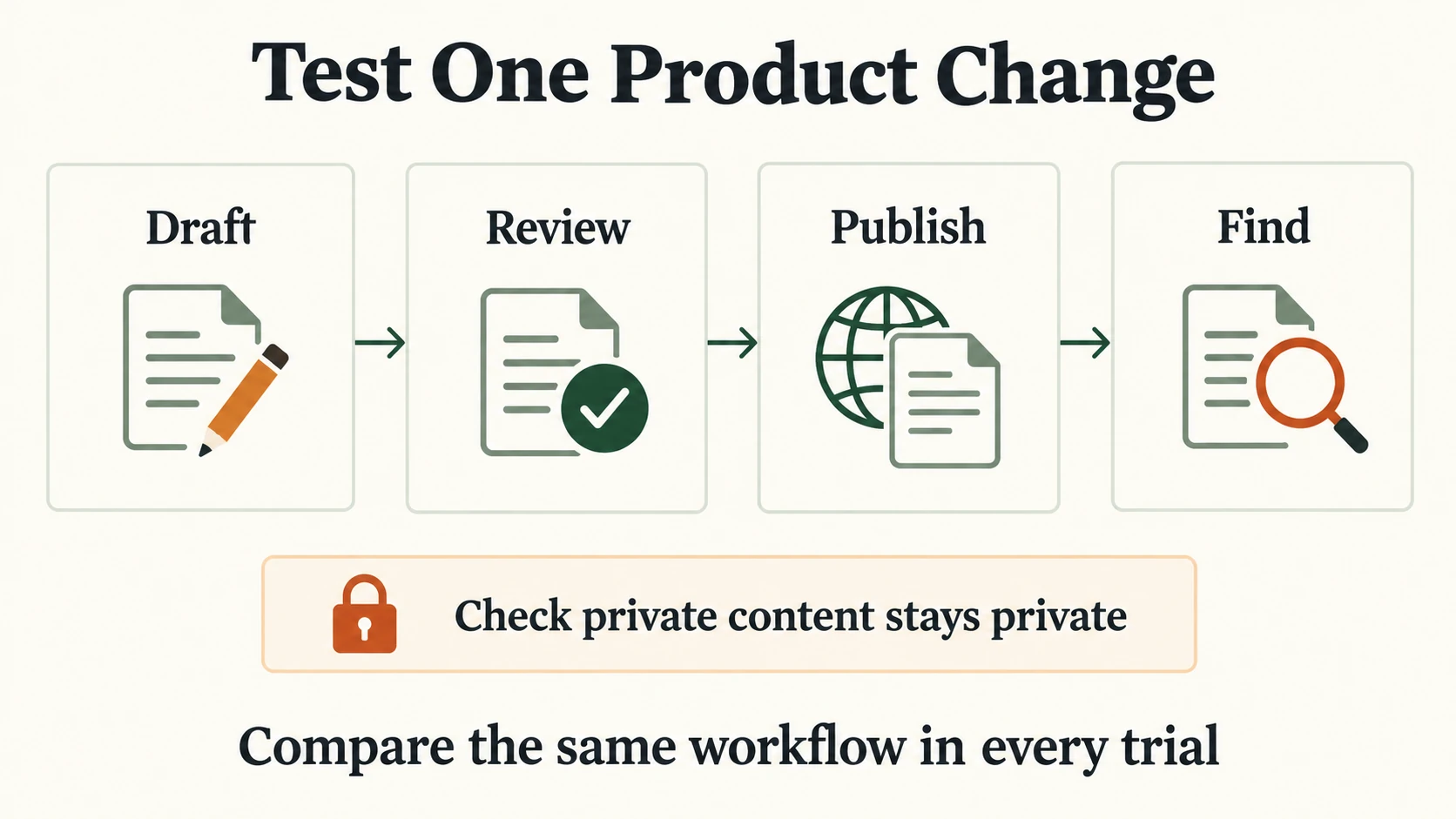
Record manual workarounds and the plan tier each step needed.
|
Your Main Requirement |
Start With |
|---|---|
|
Keep your helpdesk, add dedicated documentation |
Document360 or Helpjuice |
|
Inbox and help center for a small team |
Help Scout |
|
Knowledge as part of a full support suite |
Zendesk |
|
Messenger-based support with AI |
Intercom |
|
Product and API docs synced with Git |
GitBook |
|
Internal knowledge in an Atlassian stack |
Confluence |
|
Reusing an existing startup wiki |
Notion |
The best knowledge base software for SaaS is the one your team will actually keep up to date. Pick two candidates from the row that matches your situation, run the trial with the people who will maintain the content, and compare the full recurring cost before signing an annual contract.