

Jira Pricing 2026, Is It Worth the Cost for Small Dev Teams
- August 31, 2026
- 0
A five-person engineering team can run Jira for free indefinitely. Add ten more people and that stops being an option. That single line is the whole pricing story

A five-person engineering team can run Jira for free indefinitely. Add ten more people and that stops being an option. That single line is the whole pricing story

A five-person engineering team can run Jira for free indefinitely. Add ten more people and that stops being an option. That single line is the whole pricing story for most small development teams evaluating Jira in 2026, and everything else in this guide is about what happens on either side of that number.
Jira Cloud has four plans. Free covers up to 10 users at no cost. Standard runs $7.91 per user per month on monthly billing, dropping to roughly $6.52 per user per month if you pay annually. Premium runs $14.54 per user per month monthly, with a comparable annual discount. Enterprise is quote-only and sold on annual terms. These figures come from Atlassian’s own pricing page, and they shift often enough that it’s worth checking the live numbers before you budget against them.
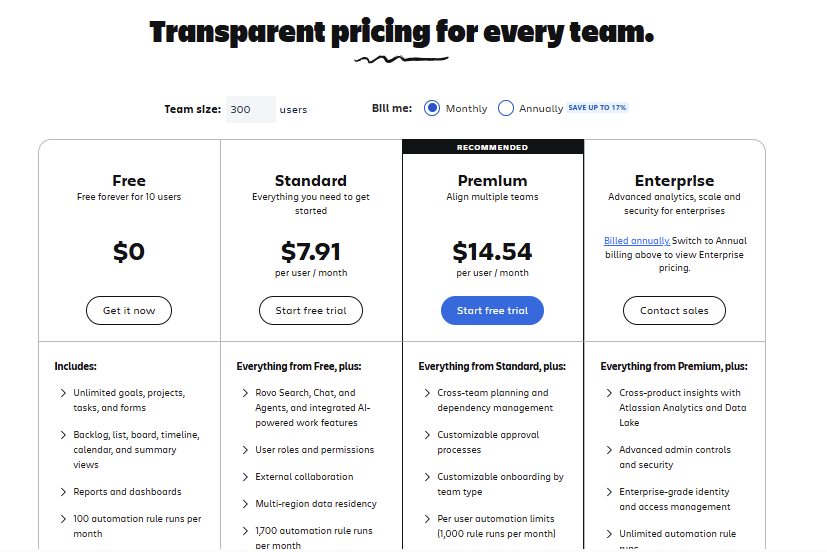
The detail that trips up a lot of small teams is that Free isn’t a stripped-down trial. It includes unlimited projects, unlimited issues, and unlimited forms, capped mainly by seat count and 2GB of storage. For a team of three, five, or even ten people doing standard sprint work, Free genuinely covers the job. The pricing conversation for most small dev teams doesn’t start until headcount crosses ten.
Once a team needs an eleventh seat, Atlassian pushes them into Standard automatically. Standard adds project roles and permissions, more granular admin controls, 9/5 support, and considerably more storage than the Free tier. It’s built for teams that need actual governance around who can see and edit what, not just more space to store tickets.
Premium is a different kind of upgrade. It adds unlimited storage, 24/7 support with a one-hour response target on critical issues, cross-project dependency tracking, a sandbox environment for testing changes before they hit production, and a meaningfully higher automation allowance. It’s also the plan that unlocks Atlassian’s AI features (branded Rovo and Atlassian Intelligence), since those sit behind Premium and Enterprise only. A small dev team rarely needs the sandbox or the SLA-backed support desk. What tends to pull small teams toward Premium is the automation ceiling on Standard, or wanting the AI assistant baked into ticket triage.
The table below uses Atlassian’s published monthly list rates for Standard and Premium, alongside Linear’s published annual rates, to show what a small team’s software bill actually looks like at a few common team sizes.
| Team size | Jira Free | Jira Standard (monthly billing) | Jira Premium (monthly billing) | Linear Basic (annual) |
| 3 users | $0 | $23.73/mo ($284.76/yr) | $43.62/mo ($523.44/yr) | $30/mo ($360/yr) |
| 5 users | $0 | $39.55/mo ($474.60/yr) | $72.70/mo ($872.40/yr) | $50/mo ($600/yr) |
| 10 users | $0 | $79.10/mo ($949.20/yr) | $145.40/mo ($1,744.80/yr) | $100/mo ($1,200/yr) |
| 15 users | not eligible | $118.65/mo ($1,423.80/yr) | $218.10/mo ($2,617.20/yr) | $150/mo ($1,800/yr) |
Two things stand out here. First, nothing changes for a Jira team until it passes ten people, at which point Free simply stops being an option and Standard becomes the floor. Second, even at fifteen seats, Jira Standard on annual billing lands close to $1,170 a year, which is still cheaper than Linear’s Basic plan at the same headcount. The pricing gap only tells part of the story though, since the two tools aren’t solving quite the same problem, which is covered further down.
The sticker price is rarely the full bill. A few categories of spend tend to catch small teams off guard once they’ve committed to Jira.
Marketplace apps are the most common one. Atlassian’s own Marketplace sells everything from advanced Gantt charts to time tracking to custom reporting, and none of it is included in Standard or Premium. Teams that need a specific workflow feature Jira doesn’t ship natively often end up paying an extra few dollars per user per month, per app, on top of the base subscription.
Confluence is the second. Jira handles issue tracking, but plenty of small teams also want a documentation space, and Confluence is priced and billed separately from Jira even though the two are commonly paired. If a team is comparing ‘Jira cost’ against ‘Linear cost’ without factoring in whether they’ll also need a docs tool, the comparison isn’t apples to apples.
Admin overhead is harder to put a number on but it’s real. Jira’s permission schemes, workflow editors, and field configuration are powerful, and that power comes with a learning curve. Teams that scale past a handful of projects often end up with someone functioning as an unofficial Jira administrator, spending real hours each month keeping workflows and permissions sane. It’s not a line item on an invoice, but it’s a genuine cost for a small team that doesn’t have spare engineering time to dedicate to tooling upkeep.
Finally, monthly versus annual billing matters more than it looks like at first glance. Paying monthly instead of annually adds roughly 20 percent to the per-seat cost on both Standard and Premium. For a team that expects to grow or shrink unpredictably, that flexibility can be worth paying for. For a team with a stable headcount, it’s money left on the table.
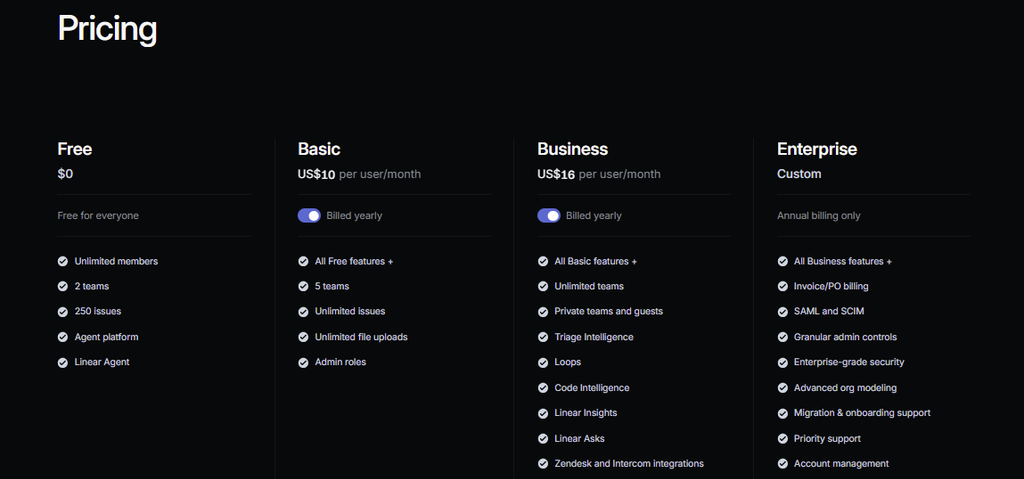
Linear’s pricing is simpler on its face, but it protects value differently. The Free plan allows unlimited members but caps a workspace at 250 non-archived issues and 2 teams, a ceiling that active teams tend to hit within months rather than years. Basic, at $10 per user per month billed yearly, removes the issue cap and raises the team limit to five. Business, at $16 per user per month, adds private teams, guest access, and Linear’s AI-driven triage and insights tools.
The practical difference for a small dev team is what each tool optimizes for. Jira’s depth pays off once a team needs custom workflows, detailed permission schemes, or reporting that spans multiple projects and stakeholders outside engineering. Linear’s simplicity pays off for a team that just wants issues moved through a pipeline quickly, without configuring much of anything first. Reddit threads and G2 reviews on both products echo this pattern consistently: teams that switch from Jira to Linear usually cite speed and reduced administrative friction, while teams that stay on Jira usually cite the customization and cross-team reporting they’d lose by leaving. Neither complaint is really about price.
A related breakdown of how the two tools stack up feature by feature lives in our Linear vs Jira comparison, and the full plan-by-plan numbers for Linear are in our Linear pricing guide.
Tools like ClickUp, Monday.com, and Trello also come up in this conversation, usually as cheaper generalist alternatives. They’re worth a look if a small team’s real need is lightweight task tracking rather than developer-specific workflows like sprints, backlogs, and Git integration, but they don’t replace what Jira or Linear are built to do for an engineering team specifically.
A small dev team gets the most out of Jira when at least one of these is true. The team is already inside the Atlassian ecosystem, using Confluence or Bitbucket, and wants one connected system rather than three disconnected tools. The team expects to grow past fifteen or twenty people within a year or two and would rather configure permissions and workflows once than migrate tools later. Or the team needs to report on work across multiple projects to non-engineering stakeholders, where Jira’s dashboards and cross-project views are genuinely stronger than most lightweight trackers.
A small dev team is more likely to find Jira unnecessarily expensive or complex when none of that applies. A five-person team building one product, with no plans to add other Atlassian tools and no cross-functional reporting need, is paying for depth it won’t use. For that profile, the Free plan covers the actual requirement, and if the team eventually needs more than Free offers, a simpler tool built specifically for small engineering teams is worth pricing out before defaulting to Jira Standard.
For teams under ten people, the question barely applies, since Free already does the job and the cost is zero. For teams between eleven and twenty, Standard at roughly $8 a seat is competitively priced against Linear’s Basic plan and cheaper in most head-to-head scenarios, provided the team doesn’t need Premium’s AI features or unlimited automation. The cost stops looking reasonable when a small team buys Premium for features it will rarely touch, or layers on Marketplace apps and Confluence without budgeting for them upfront.
The honest answer is that Jira’s price tag is fair for what it delivers, but the value only shows up when a team actually needs the depth it’s paying for. A small team that needs structure, permissions, and room to scale gets real value from Jira Standard. A small team that just wants tickets moved through a pipeline without much configuration is often better served, and better priced, elsewhere.