SaaS vs PaaS vs IaaS: The Clearest Explanation You’ll Find in 2026
July 7, 2026
0
Cloud computing has been mainstream for over a decade, and yet the three core service models at its foundation still generate genuine confusion. SaaS, PaaS, and IaaS show
Cloud computing has been mainstream for over a decade, and yet the three core service models at its foundation still generate genuine confusion. SaaS, PaaS, and IaaS show up in budget conversations, vendor pitches, and IT strategy documents constantly, and the lines between them are blurrier than most explainer articles suggest.
Part of the problem is that vendor language has evolved faster than the underlying definitions. Companies that started as IaaS providers now offer PaaS features. PaaS providers deliver SaaS-adjacent tools. SaaS companies increasingly expose APIs that let developers build on top of their platforms, blurring the boundary with PaaS.
This guide cuts through that overlap with a practical, buyer-oriented explanation. By the end, you will understand what each model means technically, when each one is the right choice, and how they typically work together inside a modern technology stack.
The Foundation: What “As-a-Service” Actually Means
All three models share one principle: someone else manages part of the technology stack so you do not have to. As IBM’s breakdownof the three service models puts it, each one provides accessible, scalable IT capabilities with a more flexible cost structure, and the models are not mutually exclusive.
The clearest analogy comes from housing. Managing your own on-premises IT infrastructure is like building a house from raw land. You source the materials, hire the contractors, and fix every problem that arises. The upfront cost is massive and the ongoing responsibility never ends.
Cloud computing lets you outsource different layers of that responsibility. IaaS is like renting raw land with utilities already connected. PaaS is renting a house with all the major systems installed. SaaS is moving into a fully furnished apartment where someone else handles maintenance.
Infrastructure as a Service (IaaS): The Foundation Layer
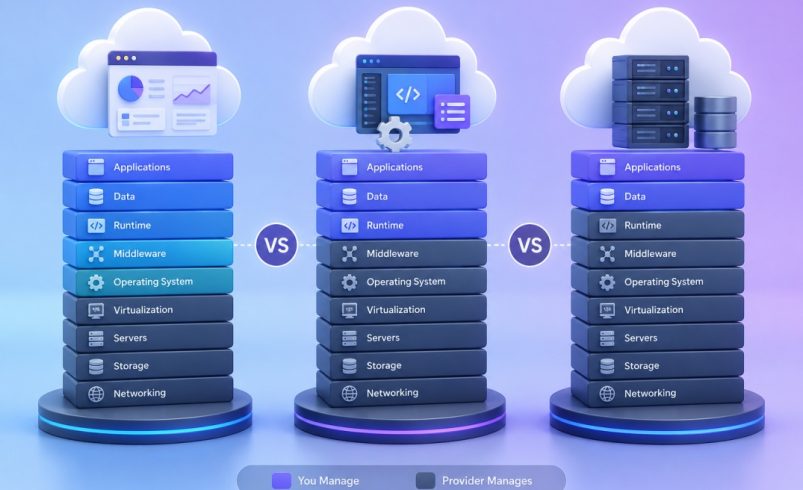
IaaS gives organizations on-demand access to virtualized computing infrastructure: servers, storage, networking, and virtualization. The cloud provider maintains the physical data center and hardware. You control everything above that layer, including the operating system, middleware, runtime environments, and applications.
The major IaaS providers in 2026 are Amazon Web Services (AWS), Microsoft Azure, and Google Cloud Platform. Each provides compute instances, object storage, virtual networking, and databases as configurable, pay-as-you-go resources.
Who IaaS is built for
IaaS requires substantial technical expertise. Someone on your team needs to understand server configuration, network security, and infrastructure scaling. For organizations with strong IT or DevOps teams, IaaS offers real advantages: fine-grained control, flexibility to run any software stack, and cost efficiency at scale.
Typical use cases include running custom-built applications, managing high-performance computing workloads, training machine learning models, and implementing disaster recovery solutions that need precise infrastructure control.
The real cost consideration
IaaS pricing is consumption-based, which creates cost variability that flat-fee SaaS subscriptions do not. At small scale, this is often more expensive. At large scale with competent infrastructure management, it is frequently cheaper. The total cost of ownership calculation must include engineering time spent managing the infrastructure, which is often the largest and most commonly underestimated cost.
Platform as a Service (PaaS): The Developer’s Layer
PaaS provides a complete managed environment for building, deploying, and running applications. The provider handles the infrastructure, operating systems, middleware, databases, and runtime environments. Developers focus on writing code without managing the underlying systems.
Examples include AWS Elastic Beanstalk, Google App Engine, Microsoft Azure App Service, and Heroku. Salesforce’s platform, which lets companies build custom applications on top of its CRM data model, also functions as a PaaS for enterprise development teams.
Who PaaS is built for
PaaS targets teams who need to build and ship applications quickly without dedicating significant engineering resources to infrastructure management. It suits teams deploying web applications or APIs on managed infrastructure, or prototyping new products rapidly.
The speed advantage is real. A team using PaaS can deploy an application in hours that would take days to configure on raw IaaS infrastructure. For startups and mid-size engineering teams, that time difference often matters most.
The tradeoffs
PaaS reduces control in exchange for convenience. If your application requires an unusual runtime version or operating system-level customization, PaaS may not accommodate it. Vendor lock-in is also a legitimate concern: applications built tightly around a specific PaaS environment can be difficult to migrate later.
Software as a Service (SaaS): The Application Layer
SaaS is the cloud computing model most familiar to business buyers. It delivers fully functional software applications over the internet, accessible through a browser or mobile app, on a subscription basis. The provider manages everything, including infrastructure, platform, software, and security. According to IBM’s 2026 cloud computing analysis, the average organization now manages 305 SaaS applications, while large enterprises use nearly 700 on average.
The examples are familiar: Salesforce for CRM, HubSpot for marketing, Slack for team communication, Zoom for video, and Notion for knowledge management.
Who SaaS is built for
SaaS is designed for business users rather than technical teams. The barrier to entry is minimal: create an account, subscribe, and start using the product. No infrastructure knowledge is required, and the vendor handles updates and security patches automatically.
SaaS makes particular sense for standard business functions where an organization does not need custom software, and for teams that need to be productive quickly without technical onboarding.
The tradeoffs
SaaS delivers the least control of the three models. Customization is limited to what the vendor’s configuration options allow, and data portability depends on what export capabilities the vendor provides. Costs are not always as predictable as they appear, either. Many SaaS vendors have moved toward usage-based or hybrid pricing models that introduce variable charges, particularly for AI-powered features. Our comparison of workflow automation tools includes a closer look at how vendors structure pricing within the same category.
Side-by-Side Comparison: SaaS vs PaaS vs IaaS
Dimension
IaaS
PaaS
SaaS
What you manage
OS, middleware, runtime, apps, data
Applications and data only
Nothing technical (configuration only)
What provider manages
Hardware, virtualization, networking, storage
Everything below the application layer
Everything, including the software
Primary user
IT teams, DevOps, infrastructure engineers
Developers, software engineering teams
Business users, any team member
Control level
Highest
Medium
Lowest
Setup time
Longest (hours to days)
Medium (minutes to hours)
Shortest (minutes)
Customization
Unlimited (within hardware constraints)
Moderate (within platform limits)
Limited (vendor-defined options)
Pricing model
Consumption-based
Consumption or subscription
Subscription or usage-based
Technical expertise required
High
Medium
Low
Vendor lock-in risk
Low (more portable)
Medium
Medium-high
Real-world examples
AWS EC2, Azure VMs, Google Compute Engine
Heroku, AWS Elastic Beanstalk, Google App Engine
Salesforce, HubSpot, Slack, Notion, Zoom
Where the Lines Blur in 2026
The three models are not as cleanly separated as any diagram suggests. Several developments in 2026 have made the boundaries more permeable.
Major SaaS vendors now expose APIs and developer platforms that function like PaaS. Salesforce’s platform allows developers to build custom applications on its infrastructure and data model, and HubSpot’s developer ecosystem supports custom integrations built on its platform.
AI workloads also do not map neatly onto traditional categories. Training large language models typically runs on IaaS infrastructure. Fine-tuning and deployment often use PaaS-adjacent managed AI services such as AWS SageMaker, Google Vertex AI, or Azure AI Studio. Consuming those models through an API from a product like OpenAI is effectively SaaS. A single AI implementation workflow may touch all three layers at once, and it is part of why agentic AI is changing what SaaS tools look like.
Many organizations also run hybrid environments deliberately, using IaaS for legacy applications that need precise infrastructure control, PaaS for new development where productivity matters, and SaaS for standard business functions. These choices are not mutually exclusive, and most mature technology stacks use all three.
How to Choose: A Practical Decision Framework
Choosing between IaaS, PaaS, and SaaS depends on three factors: your team’s technical expertise, your customization requirements, and your tolerance for operational responsibility.
Choose SaaS when you need a standard business function such as CRM, HR, or project management, your users are non-technical, and you want immediate productivity with minimal setup.
Choose PaaS when you are building a custom application, you want developers focused on code rather than infrastructure, and the platform’s constraints fit your technical requirements.
Choose IaaS when you need maximum control over your infrastructure, you have compliance or security requirements a generic managed environment cannot accommodate, or you are running workloads at a scale where custom infrastructure management delivers meaningful cost efficiency.
Most organizations do not face an either/or decision. The practical question is which model fits each specific workload, then how to integrate and govern a portfolio that spans all three. For teams evaluating specific SaaS products, our comparison of AI-native CRM platforms versus traditional CRM covers how architectural differences at the SaaS layer translate into practical differences in capability and cost.
Final Verdict
None of these models is objectively better than the others; they solve different problems at different layers of the stack. IaaS earns its complexity when your team has the engineering depth to manage infrastructure and needs the control that comes with it. PaaS is the right middle ground for development teams who want to ship applications without owning the servers underneath them. SaaS remains the default for standard business functions where speed and simplicity outweigh customization.
The more useful question in 2026 is not which single model to pick, but which model fits each workload in your stack. Most organizations already run a blend of all three, whether or not they think of it in those terms.